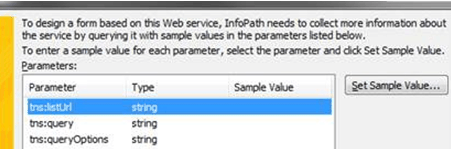
When using QueryDB or QuerySharePoint in an InfoPath 2010 form, you might encounter behavior that is different from the behavior you are used to in InfoPath 2007. When you get to the screen below, you enter values (per our previously documents for QueryDB and QuerySharePoint). If you click Back in the Data Connection Wizard, the values are removed.
In addition, if you finish the Wizard, and set the data connection to execute on load, the data connection will fail in InfoPath 2010.
This is something that changed from InfoPath 2007 to 2010. InfoPath 2010 behaves differently for some data connections, including QueryDB and QuerySharePoint.
In InfoPath 2007, you could:
- Enter the Sample Value in the Data Connection Wizard.
- Enter values in the following screen (labeled “Set Value”)
- Set the data connection to run on load.
- Preview the form and get results as expected.
If you follow the same steps in InfoPath2010, the data connection may fail on load. Therefore, in InfoPath 2010, we recommend the following:
- When you create the data connection to QuerySharePoint, set it to NOT execute on load.
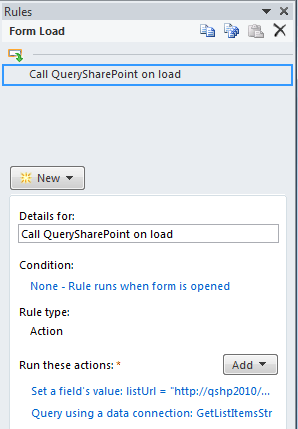
- In your form’s On Load rules, add a rule that will:
- Set the value of the parameters (e.g. listUrl and query) using “Set a field’s value”.
- Query using the data connection.