This blog entry assumes you have completed tasks 1, 2, 3 and 5 in the DBXL Getting Started document. In other words, I assume that you have already:
- Configured an InfoPath form to submit to the DBXL web service.
- Created a document type in DBXL using that form.
- Added SQL mapping.
- Successfully submitted documents and verified their shredding.
Though we can always add validation in the InfoPath form to prevent users from submitting with blank fields, we can also prevent DBXL from shredding certain documents. We call this conditional mapping.
For example, the Expense Report sample that ships with InfoPath 2007 (and is used in the Getting Started document) does not require the user to enter a Purpose. Suppose we don’t want to map documents that have a blank Purpose. In this case, we don’t want the second row in our database, because of the blank Purpose field.

So we must resort to conditional SQL mapping. For this particular example, this means “let’s only send this data to SQL when a certain field is not NULL”.
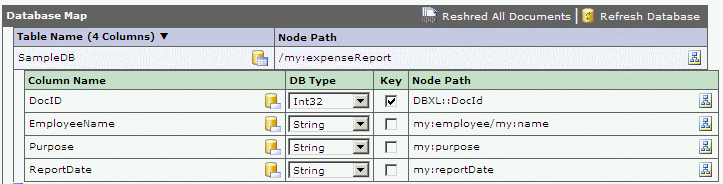
Only one small change needs to be made in the mapping. Where we previously had this:
And now we change to:
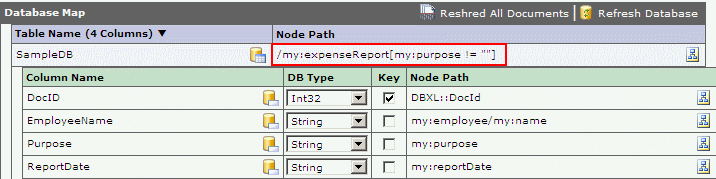
We manually added a condition in the note path for the table: /my:expenseReport[my:purpose != ""]. We empty our SQL table and click the Reshred All button in DAT, and we obtain the following data shredded into SQL:

So we have successfully filtered on the xpath, excluding (from SQL) rows where the Purpose field is blank.