August 2010 - Posts - Ernesto Machado
in

InfoPath Dev

Ernesto Machado

August 2010 - Posts

  • Using qRules on a machine with both Infopath 2007 and 2010 installed

    When trying to use qRules in InfoPath 2007, you might run into the following error IF you also have InfoPath 2010 installed on the same machine:

    An unexpected error occurred executing the rule. Action: SortTable
    Arguments:
    row: my:myFields/my:Items
    compare: my:Group
    order: ASC
    type: text

    Details: It is an error to mix objects from different versions of MSXML.

    Stack:   at Microsoft.MsoOffice.InfoPath.MsxmlInterop.MsxmlDocument.ThrowExceptionFromMsxmlInteropError(MsxmlInteropError eError)
       at Microsoft.MsoOffice.InfoPath.MsxmlInterop.MsxmlDocument.ThrowExceptionFromHresult(Int32 hrError)
       at Microsoft.MsoOffice.InfoPath.MsxmlInterop.MsxmlNodeImpl.AppendChild(String strXml)
       at Microsoft.Office.InfoPath.MsxmlWriter.Close()
       at System.Xml.XmlWellFormedWriter.Close()
       at System.Xml.XPath.XPathNavigator.AppendChild(XmlReader newChild)
       at System.Xml.XPath.XPathNavigator.AppendChild(XPathNavigator newChild)
       at Qdabra.Tools.RulesLibrary.Commands.SortTable(String domName, String rowXPath, String fieldXPathList, String orderList, String typeList)
       at Qdabra.Tools.RulesLibrary.Commands.SortTable()
       at Qdabra.Tools.RulesLibrary.Commands.ExecuteCommand()

    The issue is with MSXML interop between 2007 and 2010, which happens when a machine has InfoPath 2010 installed as well. The solution is to use InfoPath 2010 since there is no known workaround for the MSXML difference between 2007 and 2010. When you use InfoPath 2010, this error should not come up.

  • InfoPath 2010 fails to update DAT due to caching issue

    If you are using Database Accelerator (DBXL) with InfoPath 2010, you might encounter an issue when opening the DBXL Administration tool (DAT).
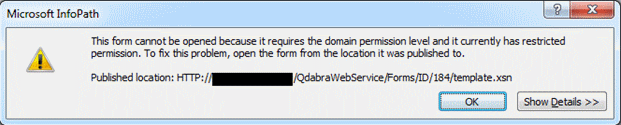
     

    If you click Show Details, you'll get: "Forms that require the domain permission level contain features that access information on a network".

    This appears to be a caching issue in InfoPath 2010, due to the fact that InfoPath 2010 doesn’t automatically attempt to get an update for the form. This only happens if you had a previous version of DBXL installed.

    The workaround is relatively simple:

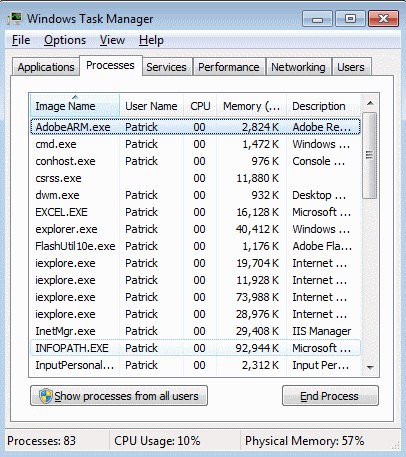
    1.    Close all InfoPath instances, and verify that the InfoPath process is not running.

    a.    Right click on the task bar and select Start Task Manager.
    b.    Click on the Processes tabs and click on the Image name header to sort the processes.
    c.    Look for InfoPath.exe.
    d.    If it exists, select it and click End Process.


    2.    Open InfoPath.

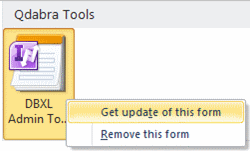
    3.    In the File tab select New. You will see the DBXL Admin Tool listed under Qdabra Tools.

    Note: If you don’t see DAT in the list of available forms, open Internet Explorer and go to the DBXL page: http://<servername>/qdabrawebservice, and then click on the DBXL Administration Tool link. The error dialog might still appear; close it. When you re-open InfoPath, you should now see DAT in the list.

    4.    Right-click on the form and select ‘Get update of this form’.
     

    5.    Close InfoPath filler.

    6.    Try to launch DAT again.

    DAT will update and InfoPath should no longer display errors whenever you click on the link in the DBXL page or open from your available InfoPath forms.

Copyright © 2003-2019 Qdabra Software. All rights reserved.
View our Terms of Use.