September 2011 - Posts - Ernesto Machado
in

InfoPath Dev

Ernesto Machado

September 2011 - Posts

  • Cannot Preview a form with qRules?

    After injecting an InfoPath form with qRules, you might be unable to open the XSN in the designer and then Preview. The error indicates:

    InfoPath cannot open the selected form because of an error in the form's code.
    Policy settings prevent opening Internet forms with managed code. To fix this problem, contact your system administrator.

    We have seen this error:

    • on machines that are not joined to a domain
    • after performing an Internet Explorer upgrade, since these updates might reset your settings.

    If you are seeing this error, there are two possible fixes to consider.

    A. Modify the Internet Explorer security option causing the issue:

    1.    Launch Internet Explorer.
    2.    Click the Tools button, and then click Internet Options.
    3.    On the Security tab of the Internet Options dialog box, select the Local Intranet zone, and then click Sites.
    4.    In the Local Intranet dialog box, clear the Automatically Detect Intranet Network check.
    5.    Select all other check boxes.


    6.    Click OK twice.
    7.    Preview your form.

    B. If you are unable to use the solution above, specify a preview domain in the Form Options dialog box of your form template. This forces InfoPath to believe that the form is being opened in the specified domain. The form must be set to Domain Trust for this option to work.

    1.    Launch Internet Explorer.
    2.    Click the Tools button, and then click Internet Options.
    3.    In the Security tab, select the Local Intranet zone, click Sites, and then click Advanced.
    4.    Add (or ensure that you've already added) the website to the domain you will use for previewing.
    5.    Click Close, and then click OK twice.
    6.    Open your InfoPath form in Design mode.
    7.    Choose Form Options from the Tools menu.
    8.    Select the Preview category.
    9.    In the Domain text box, type the website that you added to the Internet Explorer Local Intranet Websites.
    10.    Click OK.
    11.    Preview your form.

    Posted Sep 15 2011, 07:58 PM by ErnestoM with 2 comment(s)
    Filed under:
  • How to iterate a qRules command

    This technique comes from one of Qdabra’s own customers, John Shaw, who is a qRules user. This cool idea will iterate the SaveToSharePoint command for multiple file attachments. This tutorial builds on the example show in a previous document by making the command repeating.

    1.    Create a new, blank form and inject it with qRules. For information on how to do this, please refer to the qRules User Guide.

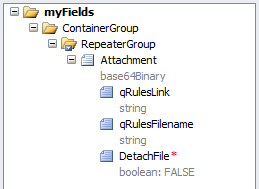
    2.    Create the following initial schema, where DetachFile is a Boolean attribute, which defaults to false. For information on the qRulesLink and qRulesFilename, see the qRules User Guide.
     

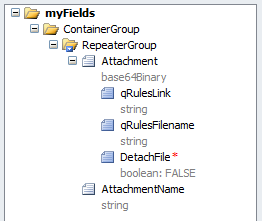
    3.    Set a text box (AttachmentName) in the repeating section. This field allows the user to name the attachment being uploaded.
     

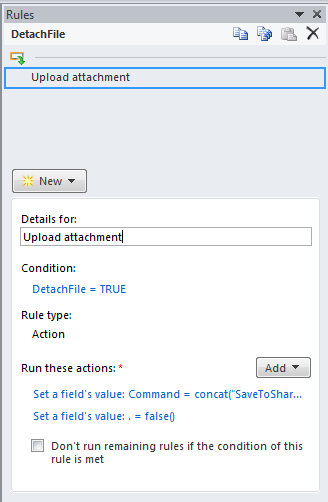
    4.    On the Boolean DetachFile node, create a rule that set the command node in the QdabraRules secondary data source to the command SaveToSharePoint. This rule will only execute when DetachFile is equal to true. The command will look like this:

    concat("SaveToSharePoint /url=<YOUR_LIBRARY_URL> /xpath= /my:myFields/my:ContainerGroup/my:RepeaterGroup/my:Attachment /name=", AttachmentName, " /overwrite=no")

    [It makes a difference if the command has "/overwrite=no". If it is set to YES, it will only ever use the first occurrence of the /name parameter. When it is set to NO, each item in the repeating table is given its correct, corresponding name.]

    5.    Add a second action to reset DetachFile back to false.
     

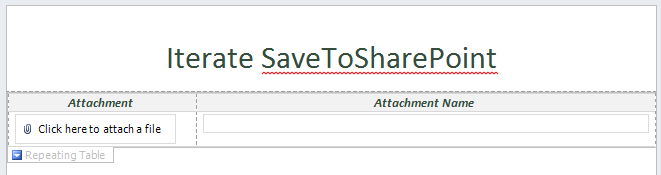
    6.    Design the form to show the repeating section. The exact design is up to you, but the screenshot below shows an example:
     

    7.    Add a button to the form and label it “Upload attachments”. This button will use rules, and its only action is to set the Boolean attribute of the attachment field to true.
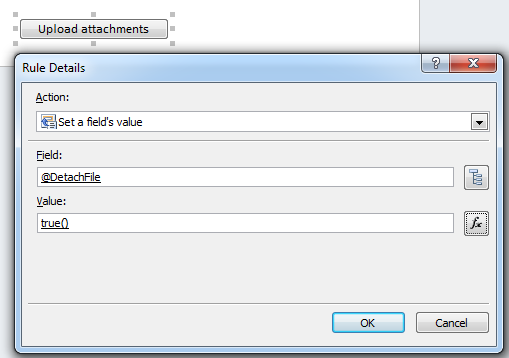
     

    Now when a user attaches more than one attachment and provides a filename for each attachment, clicking the button will iterate thru each attachment to upload it to SharePoint.

  • GetEmployeesForManager in Qdabra's Active Directory Web Service

    Yesterday, a user of Qdabra's Active Directory Web Service reported an issue via the forum.

    When calling the operation GetEmployeesForManager, the user's alias was being retrieved for both values in the dropdown.

    We have quickly investigated and fixed this such that the displayName property is returned for Display and the alias for Value. In the newest version of the tool, all APIs that return a Dropdown list will return the AD “displayName” rather than “cn” for the display value.  This was corrected for GetEmployeesForUser, FindUserByAlias and FindUserByName

    Please refer to the product page for more information on the Active Directory web service Standalone.

Copyright © 2003-2019 Qdabra Software. All rights reserved.
View our Terms of Use.