DBXL v2.4 has recently been updated to add “String(InnerXml)”
and “String(OuterXml)” in the DAT database mapping dropdowns. This allows you
to map rich text data into SQL.
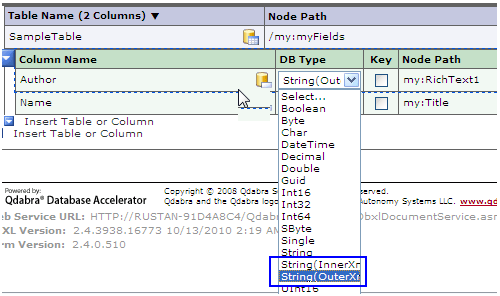
We’ll illustrate the difference between InnerXml and
OuterXml with two examples.
Example #1:
String(OuterXML) result: <my:Title><div><br/>InnerXML</div></my:Title>
String(InnerXML) result: <div><br/>InnerXML</div>
Example#2:
String(OuterXML) result:
<my:myFields xmlns:my="http://schemas.microsoft.com/office/infopath/2003/myXSD/2010-10-12T19:13:08" xml:lang="en-us">
<my:Title>Title1</my:Title>
<my:RichText1>
<strong xmlns="http://www.w3.org/1999/xhtml">
<font style="BACKGROUND-COLOR: #ffff00" color="#ff0000">Rich Text 1</font>
</strong>
</my:RichText1>
<my:RichText2>Rich Text 2</my:RichText2>
</my:myFields>
String(InnerXML) result:
<my:Title xmlns:my="http://schemas.microsoft.com/office/infopath/2003/myXSD/2010-10-12T19:13:08">Title1</my:Title>
<my:RichText1 xmlns:my="http://schemas.microsoft.com/office/infopath/2003/myXSD/2010-10-12T19:13:08">
<strong xmlns="http://www.w3.org/1999/xhtml">
<font style="BACKGROUND-COLOR: #ffff00" color="#ff0000">Rich Text 1</font>
</strong>
</my:RichText1>
<my:RichText2 xmlns:my="http://schemas.microsoft.com/office/infopath/2003/myXSD/2010-10-12T19:13:08">Rich Text 2</my:RichText2>