The Qdabra DBXL Administration Tool (DAT) allows you to quickly delete all documents from a document type: simply open the configuration for the document type, select the "Documents" tab and click on the "Delete All" button. However, you may encounter an error due to timeout if your document type contains too many documents (usually in the order of thousands).The good news is that you can use the Qdabra DBXL Migration Tool to individually delete all the documents one by one so that the timeout does not occur. Here is how you do it:
- Download a copy of the Qdabra DBXL Migration Tool from here: http://www.infopathdev.com/files/folders/document_deployer/default.aspx
- Download a scenario file for documents removal: http://www.infopathdev.com/files/folders/document_deployer/entry31629.aspx
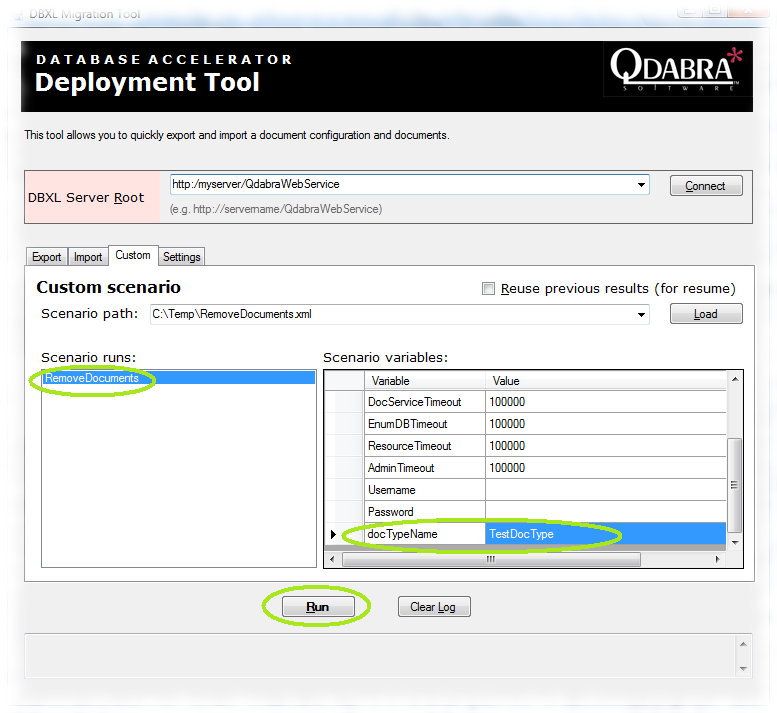
- Open the Migration Tool UI, select the "custom" tab and load the scenario you've downloaded in step 2. Scroll down in the scenario variables list and set "docTypeName" to the document type you want to clear. Select "RemoveDocuments" in the scenario runs and click "Run". This should delete all the documents from the specified document type:
About davidair
I am a Computer Science graduate from McGill University in Montreal, Canada. I have over seven years of industry experience including almost five of them spent with the Microsoft Corporation where I shipped several versions of Microsoft Office InfoPath. Originally from Russia, I am fluent in several languages, including Russian, English, French, C#, C++ and Perl. I currently reside in Montreal and work for Qdabra Software.