August 2009 - Posts - Dan Balsamo
in

InfoPath Dev

Dan Balsamo

August 2009 - Posts

  • SQL: A workaround for “Cannot generate SSPI context” when using DBXL

    When working with DBXL and other applications, you need SQL. Some organizations deal with multiple SQL instances and this can create a problem if some SQL instances are on different domains. When we attempt to connect an SQL instance using SQL Server Management Studio, we might encounter an error that reads: ‘Cannot generate SSPI context’.Here’s a workaround if you find yourself in a similar situation:


    1.     Launch command prompt (cmd).
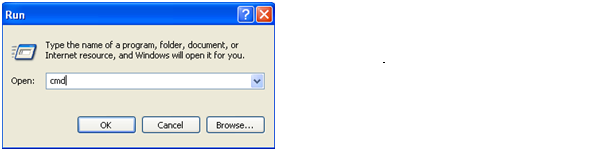
     

    2.   Use “runas” to launch SQL Server Management Studio. Specifying the userdomain\useralias of the account user.

     

      For SQL Server 2008 Management Studio, the command will be similar to this:

         runas /netonly /user:userdomain\useralias "C:\Program Files\Microsoft SQL Server\100\Tools\Binn\VSShell\Common7\IDE\Ssms.exe"

      For Microsoft SQL Server Management Studio 2005, you’ll use this:     

         runas /netonly /user:userdomain\useralias "C:\Program Files\Microsoft SQL Server\90\Tools\Binn\VSShell\Common7\IDE\Ssms.exe"


    Note: This should work on Vista, Windows 7 and Windows Server 2008, but has not been tested with 2003 or XP.

  • Identify InfoPath Version Build for Support

    When helping users with problems we have found it dangerous to make assumptions about the version of InfoPath that is installed.

    The user must first identify the version build number of his/her InfoPath:

    1. Click Start, and then click Control Panel.

    2. In Control Panel, click Add or Remove Programs.

    3. In Add or Remove Programs, locate and then click the appropriate Office edition or individual product.


    4. Click the resulting Click here for support information link. A message box displays the correct version information for the product as it is recorded by the Microsoft Windows Installer.


    Here are the Version Builds by year released: 

    InfoPath 2003 - 11.0.5531.5606
    InfoPath 2003 SP1 - 11.0.6357.6360
    InfoPath 2003 SP2 - 11.6565.6568
    InfoPath 2003 SP3 - 11.0.8173.0

    InfoPath 2007 - 12.0.6028.5000
    InfoPath 2007 SP1 - 12.0.6214.1000
    InfoPath 2007 SP2 - 12.0.6425.1000

    InfoPath 2010 - 14.0.4006.1010

Copyright © 2003-2019 Qdabra Software. All rights reserved.
View our Terms of Use.