Cannot get browser enabled form to work in IP 2007 - InfoPath Dev
in

InfoPath Dev

Cannot get browser enabled form to work in IP 2007

Last post 03-28-2012 09:28 AM by mwalton856. 5 replies.
Page 1 of 1 (6 items)
Sort Posts: Previous Next
  • 03-14-2012 04:50 AM

    • mwalton856
    • Not Ranked
    • Joined on 03-14-2012
    • Northern Virginia
    • Posts 4

    Cannot get browser enabled form to work in IP 2007

    Hi - hope someone can help me.  I set up a very simple test form.  It works great when I place the IP file in a SP MOSS 2007 document library, then open it up and submit using IP software.

    But I cannot get my second test form to work as a browser enabled form.  I've made a video walk through for users to watch.  You can see it on my YouTube channel here:

     http://youtu.be/REwoOSIZV_0?hd=1

    I'd very much appreciate it if someone can help me figure this out.  I'm excited about the progress I've made with IP and I just need to get over this hump to move on with my IP form development.

    Thanks.

  • 03-14-2012 05:17 AM In reply to

    Re: Cannot get browser enabled form to work in IP 2007

    Hi-

    Very cool to show the issue in video format. We don't see that often in this forum.

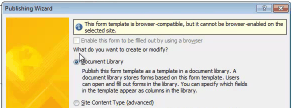
    I noticed when you were publishing the form the following screen (attached). Sorry it's small. There's a checkbox at the top to browser enable the form, and there's a message saying that the form cannot be browser enabled on this server.

    Some things to check:

    1. I believe IPFS (Forms Services) is included in MOSS 2007 and not WSS 3.0, so the first thing to confirm is that in fact it was MOSS 2007 that was installed.

    2. After confirming #1, you’ll still have to enable IPFS. Go to Start -> Administrative Tools -> SharePoint 3.0 Central Administration > Application Management > Configure InfoPath Forms Services. Check Allow users to browser-enable form templates and Render form templates that are browser-enabled

    3. Then enable IPFS for your site. Site Actions -> Site Settings -> Site collection features. Here you can activate InfoPath Forms Services support.

    Can you look into these three items and let us know what you find? Thanks.

    Ernesto Machado
    Qdabra® Software/ InfoPathDev.com
    The InfoPath Experts – Streamline data gathering to turn process into knowledge.™


  • 03-14-2012 06:08 AM In reply to

    • mwalton856
    • Not Ranked
    • Joined on 03-14-2012
    • Northern Virginia
    • Posts 4

    Re: Cannot get browser enabled form to work in IP 2007

    Hi - thank you for your reply.  I will definitely check this out with the other IT guy.  Only he has top-level admin of our SP system, so he will have to check for me and get back with me.  As soon as I have answer I will re-post here.

    Thanks again, Ernesto

  • 03-28-2012 06:21 AM In reply to

    • mwalton856
    • Not Ranked
    • Joined on 03-14-2012
    • Northern Virginia
    • Posts 4

    Re: Cannot get browser enabled form to work in IP 2007

    Hello - I am sorry that I did not reply sooner on this. I just found out some additional information and I'm hoping someone can advise me if they've ever heard of this. I was informed that our current MOSS 2007 server does not have the capability to enable browser-enabled InfoPath forms. The guy who told me this said that we would have to upgrade our MOSS 2007 server to the Enterprise edition in order to enable browser-enabled InfoPath forms. Does this sound correct? Has anyone also experienced this, where they had to upgrade to Enterprise in order to make the IP forms work in a browser? Please advise. Thank you.
  • 03-28-2012 08:27 AM In reply to

    Re: Cannot get browser enabled form to work in IP 2007

    This is correct. InfoPath Forms Services is only included with the Enterprise version of MOSS.

    Hilary Stoupa

  • 03-28-2012 09:28 AM In reply to

    • mwalton856
    • Not Ranked
    • Joined on 03-14-2012
    • Northern Virginia
    • Posts 4

    Re: Cannot get browser enabled form to work in IP 2007

    Thank you for confirming this.  It's sad that I cannot make my IP forms work unless they have a local IP copy, and if we don't have Enterprise.  But at least I know this for a fact.
Page 1 of 1 (6 items)
Copyright © 2003-2019 Qdabra Software. All rights reserved.
View our Terms of Use.