Hi-
Very cool to show the issue in video format. We don't see that often in this forum.
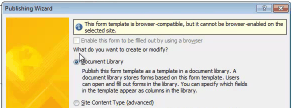
I noticed when you were publishing the form the following screen (attached). Sorry it's small. There's a checkbox at the top to browser enable the form, and there's a message saying that the form cannot be browser enabled on this server.
Some things to check:
1. I believe IPFS (Forms Services) is included in MOSS 2007 and not WSS 3.0, so the first thing to confirm is that in fact it was MOSS 2007 that was installed.
2. After confirming #1, you’ll still have to enable IPFS. Go to Start -> Administrative Tools -> SharePoint 3.0 Central Administration > Application Management > Configure InfoPath Forms Services. Check Allow users to browser-enable form templates and Render form templates that are browser-enabled
3. Then enable IPFS for your site. Site Actions -> Site Settings -> Site collection features. Here you can activate InfoPath Forms Services support.
Can you look into these three items and let us know what you find? Thanks.