SharePoint List form look up values - InfoPath Dev
in

InfoPath Dev

SharePoint List form look up values

Last post 11-28-2019 12:40 PM by Brocante. 39 replies.
Page 1 of 3 (40 items) 1 2 3 Next >
Sort Posts: Previous Next
  • 10-25-2019 02:33 PM

    SharePoint List form look up values

     Hi,


    I need help regarding an InfoPath 2013 list that I have created.

    I have a  SharePoint list with the following columns  

     Name | Principal Phone | Secondary phone | Email | Billingual | Province | user | Availability | Hours

    On another SharePoint list (Daily work list) I have a category that where an employee has to choose a province (QC, ON, B-C, AB, ATL,MB) and depending on the availability for that province on that particular day, it will show who's available (adjuster per province) on another field (adjuster field)  on the same list. It will fetch the data from the first SharePoint list (Under the availability column) with the different column above.

    My problem is when the employee goes and pick Ontario for exemple, on the adjuster field of the same list it will not show the right province. It should show today's adjuster's for Ontario, but instead it just shows the same 5 or 6 adjusters, which are from different provinces and not even available on that day.

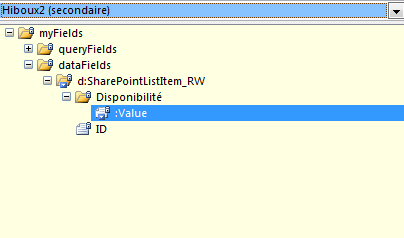
    For my list, i have created a data connection to my list with the availability column, then chose the right field which is "ID is equal to Value (Under availability) I have attached a picture above, It's in french so "Disponiblité" means "Availability". Though it will still only fetch the same 5-6 adjusters and I'm puzzled.


    I'm fairly new to this but i'd love to learn more about InfoPath and its functionalities

    English isn't my main language so please excuse me.


    Thank you very much


    Max 


  • 10-30-2019 07:12 AM In reply to

    Re: SharePoint List form look up values

     It seems like it's an issue with a field, where it fetches the field's value from a SharePoint list, but at random, instead of by availability. I thought I set it up so grabs the information on who's available everyday, and not at random.

  • 10-30-2019 12:28 PM In reply to

    Re: SharePoint List form look up values

    Any chance I can see a copy of the form? You can attach it under the options tab in a reply....
    Hilary Stoupa

  • 10-31-2019 05:15 AM In reply to

    Re: SharePoint List form look up values

     Of course!


    Thank you very much for taking the time to look at my problem. 

     Unfortunately mine is in french but the field i'm having an issue with is the "Hiboux" one (this one is actually filled with adjusters and connected to another list)

    When  you select a province under "Province" field, and then you go and click on "Hiboux" it should show the names available for that day, by the value witch you selected under "province" field (As in AB, B-C, ON, QC..etc)


    Thanks! 

  • 10-31-2019 07:50 AM In reply to

    Re: SharePoint List form look up values

    So - looking at the various data connections, I see several for "Hiboux" - one is from the default data connection for the lookup for the field labelled Hibou. The other two I'm guessing you created while working on this - but neither Hiboux1 or 2 include the Province column. We'd need that if the intent is to have the Hibou dropdown filter based on the selected Province. Can you update the Hiboux1 data connection to include the province and re-attach the template?
    Hilary Stoupa

  • 11-01-2019 03:28 PM In reply to

    Re: SharePoint List form look up values

     Of course!

    Thanks again for taking the time to look at this.


    I believe i'v added the right field "province" Under Hiboux3. Please tell me if it's right.


    Thanks! 

  • 11-01-2019 03:58 PM In reply to

    Re: SharePoint List form look up values

    Maybe try this one. Save the attached file locally (right click the link in the post header, select the option to save the file, then find the saved file, right click and select Design to open in InfoPath Designer). From there you can preview, select a province and see if the right (or any) items show in the Hibou dropdown...
    Hilary Stoupa

  • 11-05-2019 11:24 AM In reply to

    Re: SharePoint List form look up values

    Thanks, but i'm afraid i'm not seeing the file attached in the post header.

    Is it possible it's missing or it's actually one of the file I already posted above?

    Thanks! 

  • 11-05-2019 11:31 AM In reply to

    ... or maybe I forgot to attach it.... ;) Here it is.
    Hilary Stoupa

  • 11-08-2019 01:35 PM In reply to

    Re: SharePoint List form look up values

     Haha happens to the best of us!

     I opened the list into InfoPath and now it seems like it's working, as I can see different value when I switch the "Province" field to another value, like Calgary or QuĂ©bec, but Under "Hiboux" it shows numbers now and not names. Its different numbers depending on which provinces I choose but It's only showing numbers.


  • 11-08-2019 02:16 PM In reply to

    Re: SharePoint List form look up values

    Oh, ick, I see what I did wrong there. I'll see if I can fix that - it will be later today. By changing the dropdown to use Hiboux3, the values group just has the ID for the items, not the names.
    Hilary Stoupa

  • 11-08-2019 02:30 PM In reply to

    Re: SharePoint List form look up values

     I see! Should I create another data connection then? or maybe I can myself switch the options for the connection, ID..Titles..Values and all that.


    Thanks again for looking into this 

  • 11-08-2019 02:39 PM In reply to

    Re: SharePoint List form look up values

    Well - the Hiboux data connection has the right names & Ids, right? And then the Hiboux 3 data connection is the one that joins the Hiboux data with the Province data?
    Hilary Stoupa

  • 11-08-2019 02:41 PM In reply to

    Maybe try this one - I might have to set up a test on one of my sites to get the XPath right, however - I'm sort of guessing on the filter. :)
    Hilary Stoupa

  • 11-08-2019 02:49 PM In reply to

    Re: SharePoint List form look up values

     Now we're getting somewhere :D Now when I select a province it shows different adjusters ( by adjusters i mean hiboux) depending on which province I choose, but it still isnt showing the right ones, or even one that are available right now. Although it seems like it's clear on the other list which one is available or not

Page 1 of 3 (40 items) 1 2 3 Next >
Copyright © 2003-2019 Qdabra Software. All rights reserved.
View our Terms of Use.