Thanks.
So first I tried the form in Preview, just to make sure everything's working correctly. I had an issue on Preview at first. I received the message:
InfoPath cannot open the selected form because of an error in the form's code.
Policy settings prevent opening Internet forms with managed code. To fix this problem, contact your system administrator.
I know of two ways to solve this:
1. Make the form Full Trust.
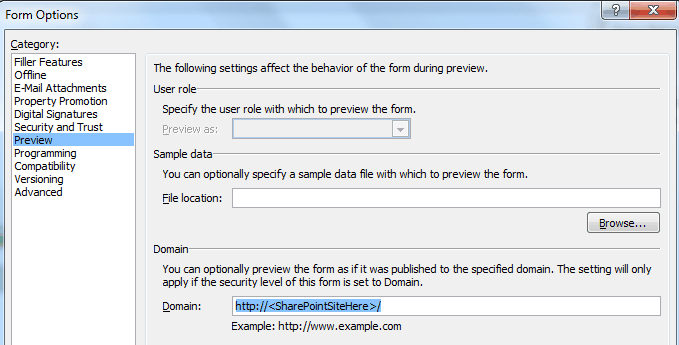
2. Keep the form as Domain Trust (or to Automatically determine...), but also enter one of my Local Intranet URLs in Form Options > Preview > Domain
I opted for #2. I then Preview and verify everything worked.
Then I published the form to my SharePoint 2010 site (the same URL I added in #2 above, a site which is in my Local Intranet settings in IE) and the command was successful.
Can you try #2 above? I'm attaching a screenshot of where to add the site in Form Options.
Let us know how it goes. Thanks.