Submitting to a SharePoint List issues - qrules? - InfoPath Dev
in

InfoPath Dev

Submitting to a SharePoint List issues - qrules?

Last post 01-29-2010 04:04 PM by Hilary Stoupa. 9 replies.
Page 1 of 1 (10 items)
Sort Posts: Previous Next
  • 01-29-2010 08:42 AM

    Submitting to a SharePoint List issues - qrules?

    Hello,I am trying to develop a form that will submit to a SharePoint list. in trying to accomplish this I have tried several tutorials and have had success as long as I stayed within the tutorial. however, none of the tutorials that I have followed cover all the options that are required of my project and I have been unsucessful in trying to modify these examples to fit my needs. hopefully someone here can help this noob with a solution.


    Following this tutorial, http://blogs.msdn.com/infopath/archive/2007/03/26/submitting-to-a-sharepoint-list.aspx,  I was able to submit to my SharePoint list however the end-users need to be able to have one of the fields (in this case “Firm”) to be a drop down box populated from a separate SharePoint list. They also require this to be a repeating table so they can add multiple entries in bluk. Since this is a no code option it would be my preferred way to accomplish this, but someone would have to point me in the right direction to achieve the drop down list and repeating table using this option.


    Following this code based tutorial, http://msdn.microsoft.com/en-us/library/cc162745.aspx, I was able to submit to the list created in the tutorial. however once I tried this with my own form and list, editing the code provided (disclaimer: I am not a code guy) was over my head and I could never get it to work. This option did let me format the form with the way the end users want to see it... but I can’t get it to work. Since I’m not a code guy, and don’t have a lot of time to invest in learning c#, this is not a good option for future development.


     Following the qdabra qrules tutorial, http://www.infopathdev.com/blogs/hilary/archive/2009/11/17/submit-items-to-a-sharepoint-list-with-qrules-v2-0.aspx, I was able to successfully recreate the tutorial. But since this example uses a form that was already created for the mapping part, I hit a wall when trying to do this with a new blank form.


    So after doing all of these tutorials several times and never finding anything that exactly worked for my situation I tried combining a few things from each. Basically I used the first tutorial to display the current list items (easy). For the adding list items in a repeating table I used the section in the second tutorial to get this looking the way I liked. I then took my form and injected the qrules code into it and followed Hilary’s tutorial for the mapping and submit options. when previewing this form the list displays fine, the drop down box is populated with the items from another list and submitting said it was successful. However when looking at the list, it just placed a blank entry in the list. Here is how my form looks now. I have also attached my form (with the qrules code injected) as well.  

    My Form


  • 01-29-2010 09:10 AM In reply to

    Re: Submitting to a SharePoint List issues - qrules?

    Hi -- taking a look at the sample you attached, I looked at the QRules data source Command node in the Logic Inspector and don't see its value being set. Are you trying to use the QRules Submit To SharePoint List command in this form? Did you create a mapping file using the InfoPath to SharePoint list tool? I don't see an XML file that looks like the mapping generated by that tool....

    Hilary Stoupa

  • 01-29-2010 09:19 AM In reply to

    Re: Submitting to a SharePoint List issues - qrules?

    I used the Qdabra Infopath to Sharepoint List Tool to perform the mapping. attached is the mapping file that was generated. I then followed the steps you outlined in the "Add Data Connections to the Form" section of your tutorial.

  • 01-29-2010 09:40 AM In reply to

    Re: Submitting to a SharePoint List issues - qrules?

    Hmmm. But you see, in your form, I don't see a resource file nor a data connection to this mapping file. And your submit data connection in your template (the one that submits to the SharePoint Lists Web service) uses a main data source node for the listName, and the Batch node from a data connection called Add List Item Template, not the information from your mapping file. And, as I mentioned, you aren't actually using qRules in this form. You've injected qRules, but it doesn't appear that you are ever setting the value of the Command node (which is how we make qRules run a rule command). I may be misunderstanding entirely what you are trying to do, so let me ask plainly: Are you trying to use the qRules Submit To SharePoint List command in this form?

    Hilary Stoupa

  • 01-29-2010 11:43 AM In reply to

    Re: Submitting to a SharePoint List issues - qrules?

    "Are you trying to use the qRules Submit To SharePoint List command in this form?" Yes, please forgive my ignorance. I am new to this aspect of infopath and the whole command node term went over my head.


    The form that I attached in my first post is a conglomeration of 3 different tutorials. I used one method to display the data from a sharepoint list, another method to make a repeating table, with drop downs populated from a separate list,  that would be used to add the list items and qrules to try and get the submit part working. The "add list item template" is being used to display the data from my first SP list, you can see the instructions that I followed for that here:

     http://msdn.microsoft.com/en-us/library/cc162745.aspx I then used qrules and your tutorial to try and get the submit function working. There is data connection called "mapping" in my form that I created using the qdabra tool.
  • 01-29-2010 12:03 PM In reply to

    Re: Submitting to a SharePoint List issues - qrules?

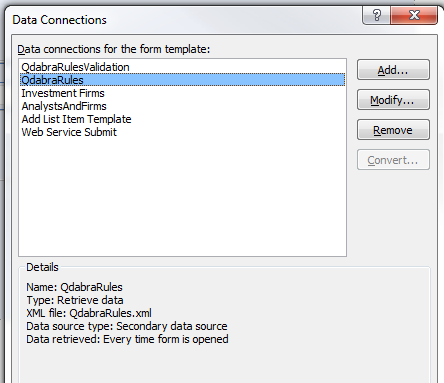
    I keep wondering if maybe you didn't post the template you meant to. You might want to take another look at the form you originally posted. I'm attaching a screenshot of the data connections in the form. As you can see, there are no data connections called mapping (which is okay, you can name that whatever you like) and if I save that template as source files, there is no sign of the XML file you posted that is a valid mapping file. The submit connection in the template you posted is using your Add List Item Template batch for the submit, and a field from the main data source in your form as the list name for the submit, I can see that plain as day in the manifest.xsf:

        <xsf:input source="Submit3.xml">
         <xsf:partFragment match="/dfs:myFields/dfs:dataFields/tns:UpdateListItems/tns:listName" replaceWith="/my:myFields/my:gpAnalysts/my:gpAnalyst"></xsf:partFragment>
         <xsf:partFragment match="/dfs:myFields/dfs:dataFields/tns:UpdateListItems/tns:updates" replaceWith="/Batch" dataObject="Add List Item Template" filter="."></xsf:partFragment>
        </xsf:input>

    This is why I keep asking whether you intend to use qRules Submit to SharePoint List -- I see no sign that anything has been done to set this template up other than simply injecting qRules.

    Hilary Stoupa

  • 01-29-2010 12:21 PM In reply to

    Re: Submitting to a SharePoint List issues - qrules?

    I think i might have attached an earlier version of that form... (I guess im getting confused in my old age.) at any rate I started from scratch:

    attached please find another form that is only using qrules to display and submit data. This form is doing the same thing, submitting a blank entry into the sharepoint list. Any ideas?


  • 01-29-2010 01:00 PM In reply to

    Re: Submitting to a SharePoint List issues - qrules?

    First thing I've noticed is that your qRules command is incorrect. It is SubmitToSharePointList -- To is capitalized. In the Qdabra Rules data source, you'll see a node called 'Error' -- put a control on your template bound to that control so you can see what is going wrong.

    Also, you are using the qRules command in your submit rules. And submitting to the web service again, after using qRules. Just add a button to your form to run the qRules command for now.

    Hilary Stoupa

  • 01-29-2010 01:19 PM In reply to

    Re: Submitting to a SharePoint List issues - qrules?

    ahhhHA, success! Thanks so much for having the patience to work through this with me. im sure that I can get the rest of the fuctionality incorporated now.

  • 01-29-2010 04:04 PM In reply to

    Re: Submitting to a SharePoint List issues - qrules?

    Oh, wonderful, I'm so glad you have it working! Have a great weekend!

    Hilary Stoupa

Page 1 of 1 (10 items)
Copyright © 2003-2019 Qdabra Software. All rights reserved.
View our Terms of Use.