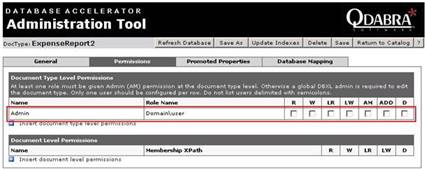
Document Type level permissions will be assigned for a security group or a user who are in Active Directory Group. Document type level permissions are enforced when we check the ‘Enforce Permissions’ check box for a Document Type in the DAT (DBXL Administration Tool). When the permissions are enforced the user in this group will be having access that is specified for that user to all the documents in a Document Type. The various permissions that can be set for a Document Type level user are Read, Write, Lock for Read, Lock for Write, Admin, Add and Delete. If no one at the Document Type level is given the Admin access then only the users given admin access at the global level and DBXL Admin will have access to edit this document type information. The user who is having ‘Write’ permission at Document Type level will automatically have the ‘Read’ and ‘Lock for Write’ at Document Type Level.
If we give Read permissions to a user at Document type level then the user can read all the documents present in the document Type. If we give Write permissions to a user at Document type level then the user has permissions to edit all the documents in this Document Type. If we give Add permissions to a user at Document type level then the user can add a document to a document Type. If we give Delete permissions to a user at Document type level then the user can delete any of the documents present in this document Type.