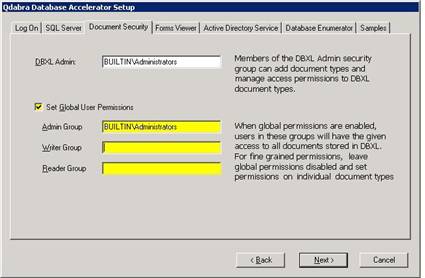
During the Database Accelerator (DBXL) install you can add permissions to the security group or a user who is in Active Directory Group. Members of the DBXL Admin security group can add document types and manage access permissions to DBXL document types. By default the DBXL Admin level permissions will be set to ‘Builtin\Administrators’.
There are three sets of permissions that can be set at the global level. We can set the Global level permissions by entering data for the security groups in the fields while installing DBXL.
i. Admin Group – this group has access to view/edit the document type information as well as being able to view/edit the various documents.
ii. Writer Group – This group can view/edit the documents. They do not have access to view or edit the document type information.
iii. Reader Group – This group can only view documents. They do not have access to edit the documents and also do not have access to view/edit the document type information.