Written by: Suzanne Olander
Follow the below steps once you are sure a form is locked.
NOTE: If the form is not locked using these actions will result in renaming the live form.
- Ensure the NAME field is promoted and visible in a view.
- Go to this view (where you can see the name of the form as a link).
- Find the locked form.
- Select the arrow to the right of the NAME field.

- From the menu select Edit Properties.
- Move to the end of the name field and add a word, TEST for example.
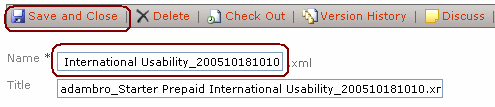
- Select Save and Close.
Result: SharePoint will return an error saying the form cannot be edited as it is locked for use by DOMAIN\alias.
You cannot edit the properties of a document while it is checked out or locked for editing.
The file "http://DUMMYSITEURL/Pending/DUMMYPROJECTNAME_NoCn_ALIAS_20060425110444.xml" is checked out or locked for editing by DOMAIN\alias.
If, instead of the error message, save occurs successfully, repeat steps 1-5 above, and then:
- Move to the end of the name field and remove the newly added characters.
- Select Save and Close.
Shiraz Cupala / Microsoft InfoPath MVPQdabra® Software / Streamline data gathering to turn process into knowledge