Getting Repeating Table Info to Populate in SharePoint Library - InfoPath Dev
in

InfoPath Dev

Getting Repeating Table Info to Populate in SharePoint Library

Last post 08-21-2019 09:23 AM by Hilary Stoupa. 1 replies.
Page 1 of 1 (2 items)
Sort Posts: Previous Next
  • 08-20-2019 02:37 PM

    • Alton
    • Not Ranked
    • Joined on 08-16-2019
    • Posts 1

    Getting Repeating Table Info to Populate in SharePoint Library

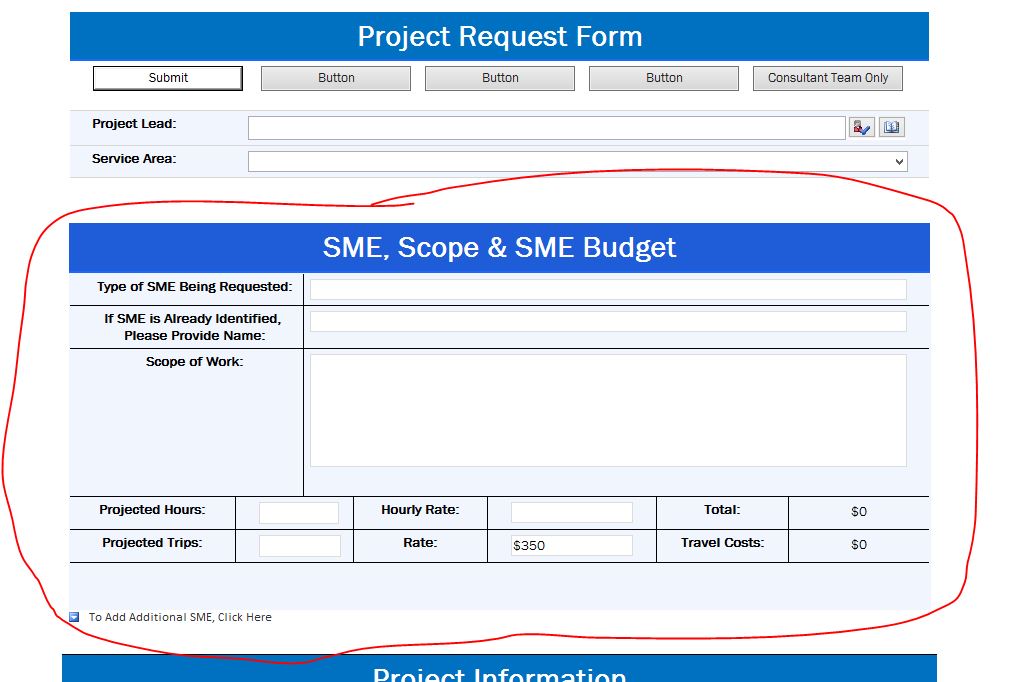
    Hi Everyone, I’m a newbie to Infopath and am just getting acquainted with it, but I’m working on developing a web-browser form that I’d like to feature a repeating table. The issue I’m having is getting the repeating section to populate to my SharePoint library. The information entered into the default fields of the repeating table is correctly captured, but if I opt to enter additional information (by selecting “Add another item, click here”) in my repeating section, that information isn’t submitted to the SharePoint library. Is there a way that I can capture that additional information entered into my repeating section, into my SharePoint library? Thanks, Alton
  • 08-21-2019 09:23 AM In reply to

    Re: Getting Repeating Table Info to Populate in SharePoint Library

    When you promote the fields, during the publishing process (the full publish, not quick publish) you have the option to change the way repeating data is promoted - you can select "Merge" instead of "First" (or other options) to promote all data to your list columns.
    Hilary Stoupa

Page 1 of 1 (2 items)
Copyright © 2003-2019 Qdabra Software. All rights reserved.
View our Terms of Use.