Rule to set multiple value to a checkbox - InfoPath Dev
in

InfoPath Dev

Rule to set multiple value to a checkbox

Last post 10-04-2018 11:38 PM by Martindt. 2 replies.
Page 1 of 1 (3 items)
Sort Posts: Previous Next
  • 10-03-2018 08:39 AM

    Rule to set multiple value to a checkbox

     Hello, I try to set multiple value of a checkbox based on previous choices. Example :
    I have 2 checkbox columns :
    Department : IT, Marketing, Admin
    Application : A,B,C,D.
    When I choose IT, I would like the application to select automatically A and B.

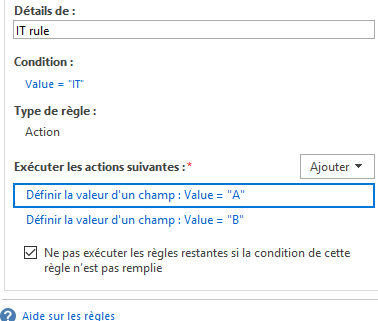
    What I've done for now is as attachment. Unfortunately it only selects the last action. How to do a "AND" ?

    I don't know if the question is understandable,
    Please ask if you don't understand.

    Thanks in advance !

  • 10-04-2018 09:58 AM In reply to

    Re: Rule to set multiple value to a checkbox

    This is not possible with rules - here's why: The multi-select control is bound to a repeating field. When you select an option in the control, InfoPath adds another instance of the repeating field. When you deselect, InfoPath deletes that instance - select a few items and take a look at the XML in a text editor & you'll see what I mean. InfoPath doesn't support inserting instances of a repeating element via rules - so what is happening is your rule is setting the default blank instance to A, then setting it to B.
    Hilary Stoupa

  • 10-04-2018 11:38 PM In reply to

    Re: Rule to set multiple value to a checkbox

    Thanks for your answer ! Is there another way to do it thanks to infopath 2013 ?
Page 1 of 1 (3 items)
Copyright © 2003-2019 Qdabra Software. All rights reserved.
View our Terms of Use.