Infopath Form Not showing in SP 2013 - InfoPath Dev
in

InfoPath Dev

Infopath Form Not showing in SP 2013

Last post 06-29-2017 05:14 AM by SoniaW316. 3 replies.
Page 1 of 1 (4 items)
Sort Posts: Previous Next
  • 06-02-2017 07:36 PM

     Not sure if my title is very helpful.

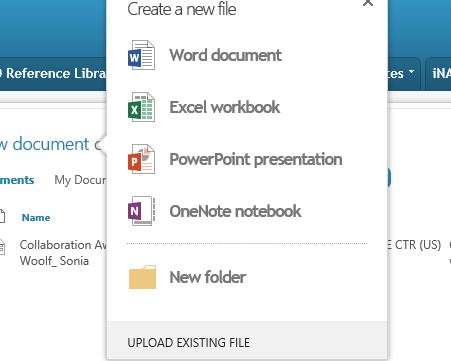
     I created a form first, I've published it 3x to different libraries.  When you click new document, instead of InfoPath you get the below window.

     If you click New in the Files tab, it does show Infopath but when you click on it, nothing happens.


    This is the first new form I've created in this environment.  We just migrated to 2013 first part of April.

    Can't figure out what I did wrong OR google properly to find out what the problem.


    Any help would be appreciated.


  • 06-05-2017 08:28 AM In reply to

    Re: Infopath Form Not showing in SP 2013

     How odd. And you published to the library using the normal publishing process from InfoPath? It does show as a form library when you view all site content?

    Hilary Stoupa

  • 06-07-2017 04:51 AM In reply to

    Re: Infopath Form Not showing in SP 2013

     Yes - everything is correct on the back end.  I went it in and changed it to OPEN IN BROWSER instead of the third option and its working now.  Still shows that box for like a second but the form does open and render.

  • 06-29-2017 05:14 AM In reply to

    Re: Infopath Form Not showing in SP 2013

    Also so the users aren't confused I changed the view back to basic table so they don't get the popup with all the choices.
Page 1 of 1 (4 items)
Copyright © 2003-2019 Qdabra Software. All rights reserved.
View our Terms of Use.