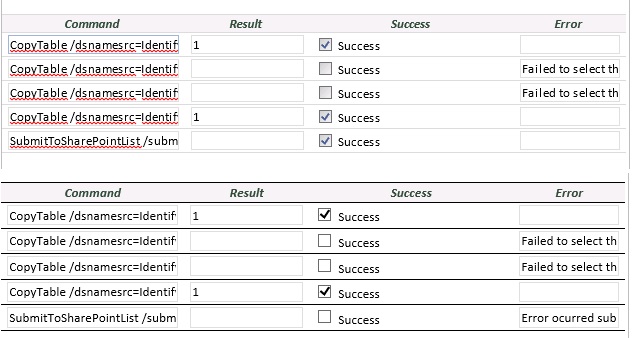
I've added the execution history to my form and I've launched the form from both InfoPath and SharePoint to compare the results. In InfoPath the form works as I expected and my SharePoint list is updated. When launched from a SharePoint page the form doesn't work as expected as my SharePoint list isn't updated.
In the screen dump I've attached to this post you will see that my form contains 5 qRules commands. The first 4 commands are CopyTable commands. Only the 1st and 4th CopyTable commands actually show as having completed successfully. This is OK though as the 2nd and 3rd CopyTable commands are essentially trying to copy empty tables so I expected that outcome. It's the 5th command I'm interested in though as this updates my SharePoint list.. When running my form from InfoPath (the top table in my screen dump) this shows has having successfully completed (although the Result column doesn't show a "1" - not sure what that's trying to tell me).
When performing the same action from SharePoint (the bottom table in my screen dump) the submit command doesn't work as there is no tick in the Success box. Unfortunately for me the error message is less than enlightening:
"Error ocurred submitting data to list: Request failed. | Error ocurred submitting data to list: Request failed."
Let's ignore the spelling mistake (or perhaps that's how occurred is spelt in US English? :-)), but what the heck is "Request failed" telling me that I don't already know?
I think I've mentioned already that my form did work from the browser OK when I first created it (ie my SharePoint list was being updated). All I've done since then is add another view and an Email submit (which works fine from the browser incidentally). Mystified.
Oh, and to answer your other question my button is just a regular button - it's not a submit button. :-(