If Current Month, Then Display Dates...how to achieve this? - InfoPath Dev
in

InfoPath Dev

If Current Month, Then Display Dates...how to achieve this?

Last post 06-01-2016 09:34 PM by missPP. 11 replies.
Page 1 of 1 (12 items)
Sort Posts: Previous Next
  • 05-28-2016 11:55 AM

    If Current Month, Then Display Dates...how to achieve this?

    Hi, sorry if this question has been answered already. If it is May, I want to show all the dates of May in my form. 1.I have xml file containing all the dates (linked to form as secondary data source) 2.I created a field using Substring(Today(),6,2). So if it is 05, I want to automatically enter all the nodes in ... Can anyone please tell me what would be the best way to achieve this...?
  • 05-29-2016 02:05 AM In reply to

    Re: If Current Month, Then Display Dates...how to achieve this?

    I found solution. I achieved this using Formatting Rule using formula to get current month... Thank you...
  • 05-29-2016 03:49 AM In reply to

    Re: If Current Month, Then Display Dates...how to achieve this?

    In fact, Filtering is better. Filtering is the solution.
  • 05-29-2016 10:49 AM In reply to

    Re: If Current Month, Then Display Dates...how to achieve this?

    In fact, no. I am using browser-compatible form. Filtering is not working when displayed on the web...
  • 05-31-2016 07:15 AM In reply to

    Re: If Current Month, Then Display Dates...how to achieve this?

    I've had trouble with filtering in browser forms too - I assume you went back to using a formatting rule for this?
    Hilary Stoupa

  • 05-31-2016 08:21 AM In reply to

    Re: If Current Month, Then Display Dates...how to achieve this?

    Oh wow thank you so much for posting in my thread...

    1. No. I tried formatting but it was not good either.
    I have submit button.
    I can hide controls, but I cannot hide space...

    2. I am still struggling...
    If you have any suggestion, I would be extremely grateful.
  • 05-31-2016 08:44 AM In reply to

    Re: If Current Month, Then Display Dates...how to achieve this?

    Any chance I can see your form? You can attach it to a reply under the options tab. :)
    Hilary Stoupa

  • 06-01-2016 02:33 AM In reply to

    Re: If Current Month, Then Display Dates...how to achieve this?

    Hi thank you for your message.
    Sorry I prefer not to upload my file but I uploaded screenshot.
    As you can see, if I filter all except Current month, which is June, May is greyed out at the top.
    July to Dec are also grayed out.
    Is there anyway to remove these, and only display controls for June?

  • 06-01-2016 03:31 AM In reply to

    Re: If Current Month, Then Display Dates...how to achieve this?

    I changed the border formatting setting. It is now invisible.
    This removed the gray part
    But there is still empty space

  • 06-01-2016 07:58 AM In reply to

    Re: If Current Month, Then Display Dates...how to achieve this?

    Oh, I see. This may be row height settings in your table or in a containing table. Make sure all table rows are set to "auto" for height.
    Hilary Stoupa

  • 06-01-2016 09:27 PM In reply to

    Re: If Current Month, Then Display Dates...how to achieve this?

    Hi thank you for your advice.
    It must be difficult for you without consulting the file.
    But please see the attached image
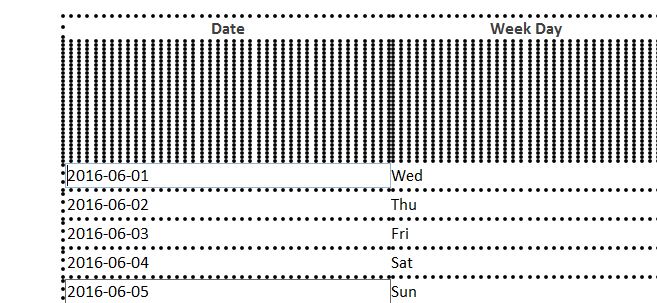
    1. It seems that controls are correctly hidden (May is ruled out), but the border of each row is not hidden.
    2. My file does not contain container table. It only has 1 repeating table.
    3. I set row heights to auto but I still get this...
    If you can think of anything else, please let me know...
  • 06-01-2016 09:34 PM In reply to

    Re: If Current Month, Then Display Dates...how to achieve this?

    I found solution!

    I was not applying rule to upper field, which is Calender in this case.
    Thank you so much!!!!!!!!!!!!!
Page 1 of 1 (12 items)
Copyright © 2003-2019 Qdabra Software. All rights reserved.
View our Terms of Use.