Hi, I'm having
the oddest issue. I have a simple form that is simply a button. Upon button
click, I need a value (I'm using Userid , which is txt_UserName) to write to a list. The
whole purpose is I simply need a way to trigger a workflow. I have created a
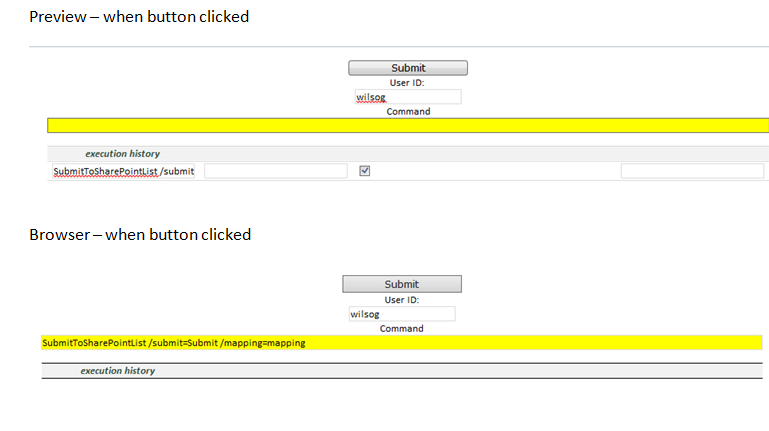
map with the mapping tool. I'm adding screenshots (top is preview in InfoPath) and bottom is browser. I've used this command many times and have this set up the same. The only difference is the simplicity. I don't have any external data connection (just the mapping and submit) and am passing only one field. I'm using InfoPath/SharePoint 2010, and qRules 6.1
In the screenshot, I have the Execution history showing (wilsog is the txt_UserName field). The top (preview), you see the command runs and is successful. In the bottom (Browser) the Command field (yellow) is populating... so it's being set, just not executing (there is no execution history). Any thoughts?
Here's my Command (I know I don't need all of this but thought maybe it would help.. ) SubmitToSharePointList /submit=Submit /mapping=mapping
Here's my map (generated from the tool)
<?xml version="1.0" encoding="UTF-16"?>
-<myFields schemaVersion="6.1">
-<Mappings mappingName="Pricing Index Mass Upload Submit">
-<Properties>
<Level>0</Level>
<ParentMapping/>
</Properties>
<ListCollection ListName="Pricing Index Mass Upload Submit" useName="false">{2ECD370A-6270-4E9C-868E-CCF99C9EF7CE}</ListCollection>
<IsRepeating>false</IsRepeating>
<RepeatingGroup/>
-<Relationships>
<RelatedList/>
<RelatedListId/>
</Relationships>
-<Mapping>
<FormField IsParentId="false" IsDate="false" IsAttachment="false" IsId="false" IsRichText="false">my:myFields/my:txt_UserName</FormField>
<SharePointColumn>User</SharePointColumn>
</Mapping>
-<Batch OnError="Continue">
-<Method Cmd="New" ID="1">
<Field Name="User"/>
</Method>
</Batch>
</Mappings>
<SharePointListURL>http://enetdev/sites/Athena</SharePointListURL>
</myFields>
Thanks!
Gwen