Really weird "zoomed in" form issue - InfoPath Dev
in

InfoPath Dev

Really weird "zoomed in" form issue

Last post 03-09-2016 03:09 PM by Hilary Stoupa. 2 replies.
Page 1 of 1 (3 items)
Sort Posts: Previous Next
  • 03-08-2016 01:00 PM

    Really weird "zoomed in" form issue

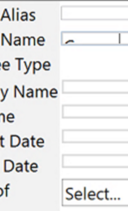
    Infopath 2013 client, only some users suffer from the issue. Attached picture for reference (can't show full form unfortunately) but some users seem to have an issue where the entire form looks like it was zoomed in way too far. Embedded pictures in the form stay the same but all the text boxes seem to zoom in some how. This makes the text boxes where the users input their information impossible to read. It's not the same effect as if you were to zoom in using ("Control" + "="). It's also only affecting certain users. I've ensured every system is up-to-date and they're all using IE11 to open the form (so am I and I have no issues)? Can't find a consistent symptom, has anyone ever seen this? I'm going crazy.....
  • 03-08-2016 01:02 PM In reply to

    Re: Really weird "zoomed in" form issue

    You can really see what I'm talking about by looking at the second text box. Drop down boxes seem to be fine?!
  • 03-09-2016 03:09 PM In reply to

    Re: Really weird "zoomed in" form issue

     Check the text size settings in IE - it needs to be Medium or you get all kinds of weirdness. :)

    Hilary Stoupa

Page 1 of 1 (3 items)
Copyright © 2003-2019 Qdabra Software. All rights reserved.
View our Terms of Use.