Hi,
when migrating from InfoPath 2010 to InfoPath 2013 I came across a problem with the date format.
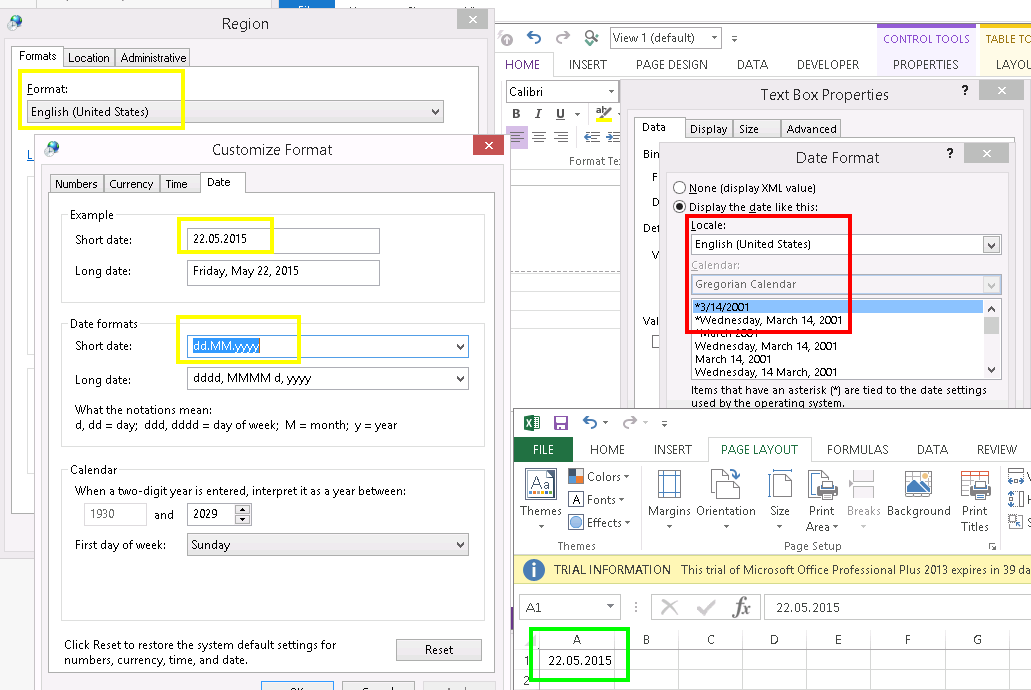
On all our computers we have modified the short date format of the US format to look like the Swiss format, i.e. dd.MM.yyyy instead of MM/dd/yyyy (Control Panel - Region and Language - Format - Additional settings).
All applications including InfoPath 2010 and Office 2013 use this modified format to represent a short date. Only InfoPath 2013 seems to ignore the modification and represents the date as MM/dd/yyyy (see screenshot)!
Changing the Region to Switzerland is not an option as we need the US format in the Region setting to have English months and weekdays.
Manually setting the format for every form and view also is not really an option as there are many forms in production...
Any suggestion is appreciated.
Thomas