Extra Space on Concatenated Field When Promoted to Sharepoint - InfoPath Dev
in

InfoPath Dev

Extra Space on Concatenated Field When Promoted to Sharepoint

Last post 07-10-2013 08:30 AM by Jen B. 3 replies.
Page 1 of 1 (4 items)
Sort Posts: Previous Next
  • 07-09-2013 09:20 AM

    Extra Space on Concatenated Field When Promoted to Sharepoint

    Hello all,

    I have discovered that an extra space is being added in front of a choice when Infopath pushes my concatenated field to sharepoint. 

    I'm using an IP 2010 filler form published to a MOSS 2007 site.

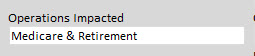
    I have repeating dropdown fields and multi-selection fields setting specific text fields using a concat formula.  The text field, when in the form, does not have an extra space, but the field in sharepoint is adding a space in front of the first choice.

    The formula on the set concatenation formula is: substring(eval(eval(Operations_Impct_Source[. != ""], 'concat("; ", .)'), ".."), 2)
    Where Operations_Impct_Source is the repeating dropdown field.

    The text field being set has a formula in the Default Value that is the same: substring(eval(eval(Operations_Impct_Source[. != ""], 'concat("; ", .)'), ".."), 2)

    Again, the text field when I look at it in the form, does NOT have an extra space at the beginning. (see attached file)  However, when promoted to sharepoint, an extra space is inserted at the before the selection.

    Any thoughts?

    Thanks!


  • 07-09-2013 09:34 AM In reply to

    Re: Extra Space on Concatenated Field When Promoted to Sharepoint

    Second screenshot


  • 07-09-2013 12:22 PM In reply to

    Re: Extra Space on Concatenated Field When Promoted to Sharepoint

    It looks like this space is originating from the space in "; ". The substring is stripping off the leading semicolon, but not the space. To fix this, simply change the 2 to a 3.

    Jimmy Rishe / Software Developer / Microsoft MVP
    Qdabra Software
  • 07-10-2013 08:30 AM In reply to

    Re: Extra Space on Concatenated Field When Promoted to Sharepoint

    Thanks Jimmy.  I'll try that and publish later this week to see if it worked.

Page 1 of 1 (4 items)
Copyright © 2003-2019 Qdabra Software. All rights reserved.
View our Terms of Use.