Hiding a section of an Infopath form based on Sharepoint List - InfoPath Dev
in

InfoPath Dev

Hiding a section of an Infopath form based on Sharepoint List

Last post 04-16-2013 10:36 AM by DebiScott. 2 replies.
Page 1 of 1 (3 items)
Sort Posts: Previous Next
  • 04-15-2013 11:21 AM

    Hiding a section of an Infopath form based on Sharepoint List

    I have a sharepoint list with AD usernames in it and I want to hide a section of an infopath form if you are not a member of that list.
  • 04-15-2013 05:26 PM In reply to

    Re: Hiding a section of an Infopath form based on Sharepoint List

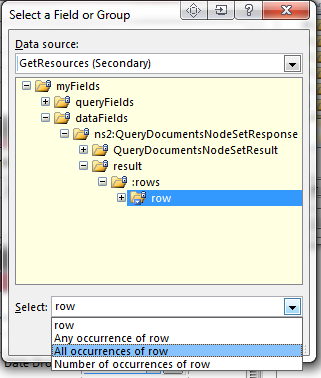
     Okay. You need to add a data connection to the list. Then add a conditional formatting rule on the section - in the first dropdown, select your list data connection and select the field for the username - you'll see with repeating data, the "Select" has a drop down (see screenshot - mine isn't a list data source, I just wanted you to see the drop down because it can be tricky to find) - pick "all occurrences" of your field. Set the condition to be "are not equal to" and set the last drop down to use a formula - use the username function there.

    Hilary Stoupa

  • 04-16-2013 10:36 AM In reply to

    Re: Hiding a section of an Infopath form based on Sharepoint List

    Thanks Hilary - Works like a charm!

Page 1 of 1 (3 items)
Copyright © 2003-2019 Qdabra Software. All rights reserved.
View our Terms of Use.