Using CopyTable with Null Values in SQL results - InfoPath Dev
in

InfoPath Dev

Using CopyTable with Null Values in SQL results

Last post 12-31-2012 09:58 AM by Hilary Stoupa. 5 replies.
Page 1 of 1 (6 items)
Sort Posts: Previous Next
  • 12-31-2012 06:17 AM

    Using CopyTable with Null Values in SQL results

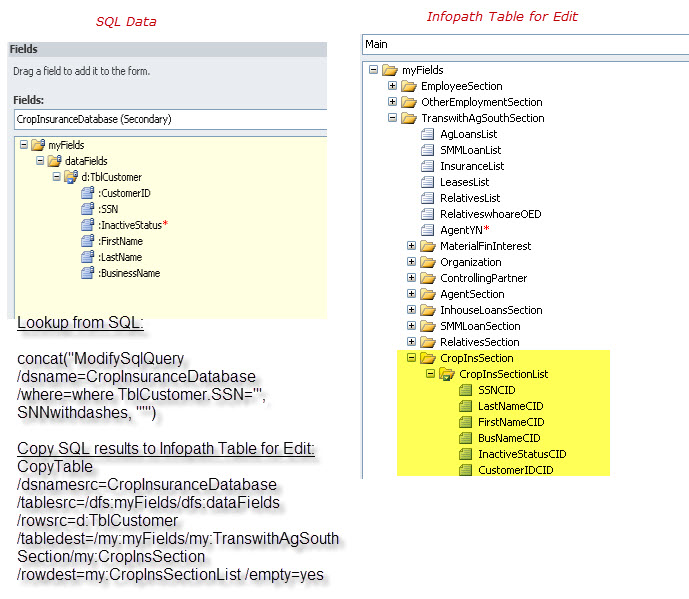
    I have successfully used QRules to copy the results from a SQL query into a Infopath repeating table.  The goal is to pull current values from one of our systems into this form and then allow the user to delete/modify those results.   The issue I am having is if one of the columns of data is null it appends the data to the wrong column in the editable table (see attached for screenshot).  Is there a "switch" that I need to add that will allow it to consider null values as valid values when using the Copytable function?

    Here's the code I am currently using. The attached has a screenshot of the results as well as my data field structure.

    To pull data from SQL table:

    concat("ModifySqlQuery /dsname=CropInsuranceDatabase /where=where TblCustomer.SSN='", SNNwithdashes, "'")

    To copy to editable table:

    CopyTable /dsnamesrc=CropInsuranceDatabase /tablesrc=/dfs:myFields/dfs:dataFields /rowsrc=d:TblCustomer /tabledest=/my:myFields/my:TranswithAgSouthSection/my:CropInsSection /rowdest=my:CropInsSectionList /empty=yes 


    Filed under: ,
  • 12-31-2012 08:05 AM In reply to

    Re: Using CopyTable with Null Values in SQL results

    This sounds like a bug - let me see if I can reproduce it. What version of qRules are you using?
    Hilary Stoupa

  • 12-31-2012 08:34 AM In reply to

    Re: Using CopyTable with Null Values in SQL results

    Here's the results I get.  I'm using version  4.2.  Thanks!


  • 12-31-2012 08:42 AM In reply to

    Re: Using CopyTable with Null Values in SQL results

    Looking at your first post again, now that you've posted your results - your fields in your main data source appear to be in a different order than your secondary - copy table just copies the first field in the source data source to the first field in the destination data source and so on. Is your form in production yet? If not, you might want to just rearrange your data source to match your secondary.
    Hilary Stoupa

  • 12-31-2012 09:46 AM In reply to

    Re: Using CopyTable with Null Values in SQL results

    I'll give that a shot.  Not in production yet :)  Thanks!


    BTW...you are amazing!  I have used responses on this forum to help me with this.  First timers using Qrules.

  • 12-31-2012 09:58 AM In reply to

    Re: Using CopyTable with Null Values in SQL results

    I'm glad the forum has been helpful! qRules has a bit of a learning curve, but it really can give your forms fantastic functionality w/out you having to write your own code. Let me know if putting your nodes in the same order solves the issue for you. :-)
    Hilary Stoupa

Page 1 of 1 (6 items)
Copyright © 2003-2019 Qdabra Software. All rights reserved.
View our Terms of Use.