Sharepoint 2010 + Infopath 2010 = Confused 2012 :) - InfoPath Dev
in

InfoPath Dev

Sharepoint 2010 + Infopath 2010 = Confused 2012 :)

Last post 05-03-2013 03:00 PM by Chris_K. 19 replies.
Page 1 of 2 (20 items) 1 2 Next >
Sort Posts: Previous Next
  • 11-27-2012 05:45 PM

    Sharepoint 2010 + Infopath 2010 = Confused 2012 :)

    I have been recently tasked to takeover SP and so far have been fumbling my way through troubleshooting and user requests, but I have banging my head against the wall for what seems to be something that's very simple, and I'm sure someone else has been down this road. I know I'm probably just missing something small and that's what is making me frustrated and confused. So here goes. Excuse me if I'm referencing items by the wrong names, but hopefully I will get enough info out that it will make sense to someone.

    The gist of it is this: I just need to add a few new fields to an existing SP/IP workflow task form. I'm literally trying to update the form with a new checkbox that is submitted/linked to SP as a column(?)

    The part that is confusing to me is that all of the existing fields that are linked to SP are under the "Main" data connection, and it looks like they are locked. I managed to add a new data source, point it to the SP site, and then have access to that field, but I'm wondering why the other fields aren't like that already? I had assumed that adding the new field in SP-land would make it viewable on the IP form to add, but no dice.

    I have saved the form locally for editing but that didn't seem to make a difference. Do I have to unlink it then relink it SP to get updated columns???

    Hopefully some of this makes sense; again my apologies if my terminology is incorrect but I'm very new on both frontiers.

    Any help would be much appreciated!
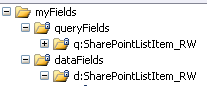

  • 11-28-2012 04:36 AM In reply to

    Re: Sharepoint 2010 + Infopath 2010 = Confused 2012 :)

    Hi,

    From the screenshot, it looks like you have a locked schema, resulting from a SharePoint list form.

    SharePoint list forms are generated based on the SharePoint list columns. If you need to modify the form's schema, you would first have to add the columns to the list, when regenerate the SharePoint list form. There's a button in the SharePoint ribbon that will open the form in design mode; that's what you want to click after adding the new columns.

    Hope this helps!

    Ernesto Machado
    Qdabra® Software/ InfoPathDev.com
    The InfoPath Experts – Streamline data gathering to turn process into knowledge.™


  • 11-28-2012 06:24 PM In reply to

    Re: Sharepoint 2010 + Infopath 2010 = Confused 2012 :)

    Do I have to do something special on the workflow itself? All i see for that workflow task in the SP ribbon is Open/Cancel. Thx!
  • 12-05-2012 03:39 PM In reply to

    Re: Sharepoint 2010 + Infopath 2010 = Confused 2012 :)

    OK, I've done some more digging and here's where I think the problem lies. When the InfoPath form was initially created, it was not tied directly to a SP datasource, but rather a choices.xml file was created. I can add a new SP datasource but I'm not sure if that's the proper method as 99% of the info will be pulled from choices.xml.... Is there a way to convert the entire form to use the SP datasource? Also I noticed when I try to select data fields now, it makes a "repeating" control... not sure about repeating vs. non-repeating... Thanks.
  • 12-05-2012 03:48 PM In reply to

    Re: Sharepoint 2010 + Infopath 2010 = Confused 2012 :)

    Any chance I could get you to attach your form to a reply under the Options tab? I'm totally lost reading this - what created choices.xml? IP created this? Or the form was created intentionally from it? Or? :-)
    Hilary Stoupa

  • 12-05-2012 04:34 PM In reply to

    Re: Sharepoint 2010 + Infopath 2010 = Confused 2012 :)

    So basically we have a sharepoint workflow, which has a series of tasks, and each of those tasks has an infopath form to be filled out by various departments. As a department completes an infopath/sharepoint form, it gets passed onto the next department. I think the original creator of these forms compiled(?) the datasource from sharepoint so now it's static, meaning the changes I make on sharepoint don't seem to matter. The infopath form's datasource for the form is a choices.xml file as opposed to a direct link to a sharepoint list. If I had to guess it was set up as a template or something and then published, and not initially tied to sharepoint... I added a new datasource, that connects directly to my sharepoint list, which allowed me to access my new fields, but I'm wondering if there is a different way to do this. Posted above, it makes sense that I have to rebuild the list form from Sharepoint to recreate the choices.xml datasource but I don't see an option for that... Hopefully this info helps.
  • 12-05-2012 04:40 PM In reply to

    Re: Sharepoint 2010 + Infopath 2010 = Confused 2012 :)

    List of various forms tied to workflow that I see in SP Designer. I want to edit the first one. Clicking on it opens Infopath editor. See the fields screenshot above, that is what I see when trying to get the updated SP list field values.
  • 12-05-2012 04:42 PM In reply to

    Re: Sharepoint 2010 + Infopath 2010 = Confused 2012 :)

    An existing dropdown in my form. "Choice9" is the name of the field. It's a non-repeating control, whatever that means... All I am trying to do is add another checkbox/dropdown to my existing form! Seems so simple...
  • 12-05-2012 04:45 PM In reply to

    Re: Sharepoint 2010 + Infopath 2010 = Confused 2012 :)

    Right-clicking and choosing the Drop-Down List Box Properties shows that the data source is from an sharepoint-generated data source called "Choices Data Connection" (from what I've read) as opposed to a dynamic Sharepoint list. I can add a new data source, point it to sharepoint and get my new field, but I would rather edit the existing data source somehow so that everything matches up.... Hopefully this helps and doesn't make things more confusing :)
  • 05-02-2013 10:24 AM In reply to

    Re: Sharepoint 2010 + Infopath 2010 = Confused 2012 :)

    Hi Hilary, I'm back at it again. :-S Would the .xsn file suffice?
  • 05-02-2013 12:45 PM In reply to

    Re: Sharepoint 2010 + Infopath 2010 = Confused 2012 :)

     Yes - sorry, it is much easier for me to understand if I can see the template.

    Hilary Stoupa

  • 05-02-2013 02:23 PM In reply to

    Re: Sharepoint 2010 + Infopath 2010 = Confused 2012 :)

    Hi Hilary, Template emailed :)

    I found something interesting today in my eternal digging for the answer to this seemingly simple question. It looks as though the template files are not in the default location. I'm wondering if they were built in Visual Studio or something like that, pre-SP 2010...

    When I go into SP, go into the task list, list settings, form settings, I can pick the content type that the task form is associated with. Then I can click edit form. But when I do so it comes up completely different than the actual template. Fields are missing, and the theming has changed. Just as a test I made some tweaks and published it and sure enough I was able to edit/add new fields! But after doing so I lost other things. There is a "Consolidated Comments" field that looks like it's being shared with other task forms. Also before publishing my test, if the task was not complete, opening it would take you directly to edit mode. Completed tasks would take you to view mode. After uploading this new template it reverted to typical SP functionality; clicking on the task form would pull up a view, and now show a ribbon with Edit Item, that was previously hidden. It also seemed to break my form buttons.

    Also, it was now publishing the form to a different location, in short, Workflow Name/Content Type/template.xsn instead of Workflow Name/Content Type.xsn...

    In the end I found out how to revert, and it was to go into the Task associated with the infopath form in SharePoint Designer and revert the display form and edit form.

    1) Open workflow
    2) Open workflow task
    3) Under content types, click the corresponding type for this form
    4) Edit display form AND edit form to: _layouts/WrkTaskIP.aspx
    5) Clear New form (no value)
    6) Save content type

    I'm starting to wonder if this whole workflow was built by a 3rd party and imported into our environment...
  • 05-03-2013 07:57 AM In reply to

    Re: Sharepoint 2010 + Infopath 2010 = Confused 2012 :)

     So - and I apologize for the trouble I'm having following / understanding this thread, but it is Friday and my brain feels a little broken right now - can you please summarize what you need to do with the form template you sent me that you can't do? The original post was simply about adding a checkbox - and I can see on opening the form that we can't do that via the schema, it is locked. Since this is a workflow form, you need to actually add the fields in SharePoint Designer (although you can open in IP for design changes, adding rules and so forth). This thread seems to describe the process.

    Hilary Stoupa

  • 05-03-2013 09:32 AM In reply to

    Re: Sharepoint 2010 + Infopath 2010 = Confused 2012 :)

    Hilary Stoupa:

     So - and I apologize for the trouble I'm having following / understanding this thread, but it is Friday and my brain feels a little broken right now - can you please summarize what you need to do with the form template you sent me that you can't do? The original post was simply about adding a checkbox - and I can see on opening the form that we can't do that via the schema, it is locked. Since this is a workflow form, you need to actually add the fields in SharePoint Designer (although you can open in IP for design changes, adding rules and so forth). This thread seems to describe the process.

    Yes I think I'm on the right track with that. So I open the workflow in designer, then edit the associated task. I see all the fields there so I add my new fields, save the task, and publish the workflow. I also go into the workflow task list, which has a content type that matches the name of my .xsn template. I add an existing field here which is the one that I added in the task for field. I save and publish.

    NOW, everything looks good up to this point. When I go back to the workflow it shows the .xsn with an asterisk and (needs update) trailing!!! Perfect, so I open the template, and InfoPath tells me the form has new fields and it will update the fields now, and that I may have to add/remove them to the form. Also great news. I click OK, and the new fields don't appear... It's as if something is not properly updating.
  • 05-03-2013 09:45 AM In reply to

    Re: Sharepoint 2010 + Infopath 2010 = Confused 2012 :)

     Where are you looking for the new fields? In the fields pane? (Sorry if that sounds super patronizing - but just want to be clear that I don't think the fields will appear on the form's layout until you add them...)

    Hilary Stoupa

Page 1 of 2 (20 items) 1 2 Next >
Copyright © 2003-2019 Qdabra Software. All rights reserved.
View our Terms of Use.