Repeating Table Sum Total - InfoPath Dev
in

InfoPath Dev

Repeating Table Sum Total

Last post 10-11-2012 08:13 AM by divaldo. 3 replies.
Page 1 of 1 (4 items)
Sort Posts: Previous Next
  • 10-11-2012 04:49 AM

    Repeating Table Sum Total

    Hi,

    I have a form that pulls it data from a SQL database, then displays it in a repeating table.

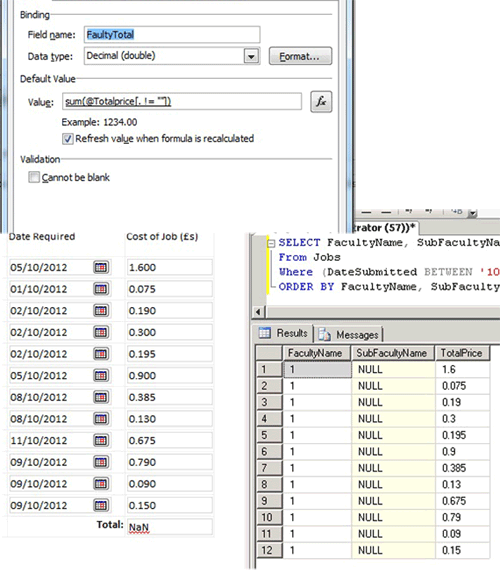
    The database holds information about reprographics/print usage and keeps a total for each print job.  The form then displays each of these jobs filtered by each faculty in a repeating table.

    At the bottom of the table, i'd like to show a total cost for all the jobs but the noyl value I can get in there is 'NaN'.

    When I run the query on the SQL server, there are no NULL values and everything looks ok.  I can also SUM up the total of this column within SQL with no problems.

    I've included screenshots of the SQL data, the Infopath form results and my 'Total' textbox properties.

    Can anyone help me please?

    Many thnaks.

  • 10-11-2012 05:01 AM In reply to

    Re: Repeating Table Sum Total

    I forgot to mention, my total box and the field in the repeating table I am trying to add up are both set to be numerical fields with three decimal places, I don't know if that makes a difference.
  • 10-11-2012 07:59 AM In reply to

    Re: Repeating Table Sum Total

    What happens if you try the sum formula w/out the filter ([. != ""])? Still NaN (Not a Number)?
    Hilary Stoupa

  • 10-11-2012 08:13 AM In reply to

    Re: Repeating Table Sum Total

    Yes stil the same.

    Thanks for the reply Hilary.

     I think I have figured it out though.  The column holding the numbers in the SQL database was set to a data type of 'float'. When i changed it to an integer the form worked.

     However, I need it to remain as 'float' in SQL, so to get around the problem, I changed the format of my cost box to be 'none (display XML data)' rather than decimal or a currency and so far so good!

Page 1 of 1 (4 items)
Copyright © 2003-2019 Qdabra Software. All rights reserved.
View our Terms of Use.