Expression Box Properties in InfoPath 2007 - InfoPath Dev
in

InfoPath Dev

Expression Box Properties in InfoPath 2007

Last post 08-31-2012 07:44 AM by Gennady Vanin (Геннадий Ванин, Новосибирск). 2 replies.
Page 1 of 1 (3 items)
Sort Posts: Previous Next
  • 08-30-2012 09:06 AM

    Expression Box Properties in InfoPath 2007

    I have created an Expression Box; how do I find the name of it?

    I need to conditionally format a section based on the value of this Expression Box.

  • 08-31-2012 02:47 AM In reply to

    Re: Expression Box Properties in InfoPath 2007

    Are you saying you're using the Expression Box to show the value of a certain formula, and you want to format a section based on the same formula?

     There isn't a way to reverence the value of an Expression Box.  You have two options:

    1. Incorporate the same formula into your conditional formatting.

    2. Use a readonly field that uses that formula as its default value formula, and then reference that field from your formatting conditions.

    Jimmy Rishe / Software Developer / Microsoft MVP
    Qdabra Software
  • 08-31-2012 07:44 AM In reply to

    Expression box control in 2007 probably was substituted by Calculated value control in 2010, which again desn't have underlying data field.

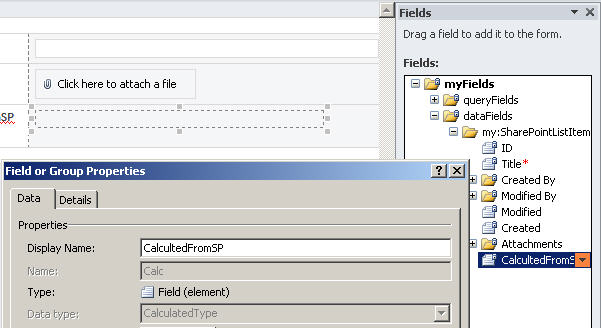
    But it is possible to create in a sharepoint list a column of type Calculated (calculation based on other columns) which upon creating Infopath Sharepoint List Form (by clicking "Customize Form" on ribbon) has in Infopath a Calculated control with underlying data field of type CalculatedType which, so, can be referenced. 

    Funny but it is impossible to create a data field of such type explictly in Infopath Designer 2010...


    Gennady Vanin (Novosibirsk) --- Геннадий Ванин (Новосибирск)
Page 1 of 1 (3 items)
Copyright © 2003-2019 Qdabra Software. All rights reserved.
View our Terms of Use.