Dear Forum,
I have some experience with SharePoint 2010 and SharePoint Designer 2010, and almost no experience with InfoPath.
I have created a custom workflow solution using SharePoint Designer 2010. I am attempting to add the field 'Purchase Order' to the Task form 'Initial Invoice Review'. I have created a (secondary) Data Connection to the 'Supplier Invoice' document library and selected the 'Purchase Order' field.
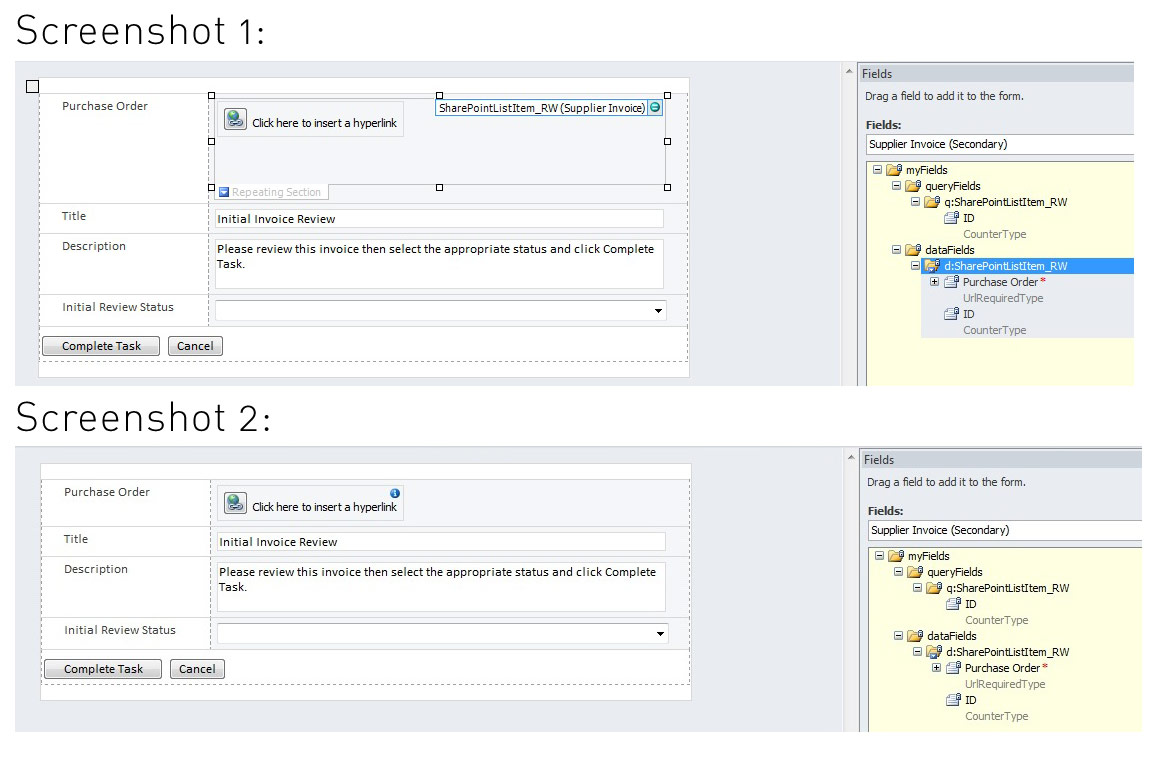
When I drag the 'Purchase Order' field onto the form it includes the field inside a repeating section. See Screenshot 1. When I display the form on the SharePoint site it displays links to multiple Purchase Orders - which is not correct; it should only display one Purchase Order per form.
If I drag the field outsode of the Repeating Section and delete the Repeating Section I get the following informational message: 'Purchase Order (Supplier Invoice)(Control cannot store data correctly). See Screenshot 2. When I display the form on the SharePoint site it doesn't display a link to the Purchase Order.
Can someone suggest how I can display this field please. Is this the wrong way, and is there some other way to do this?
Any help would be greatly appreciated. Thanks in advance.
Kind Regards
Walter