I'm not looking for the XML conversion method nor client-based forms (only web-browser based forms).
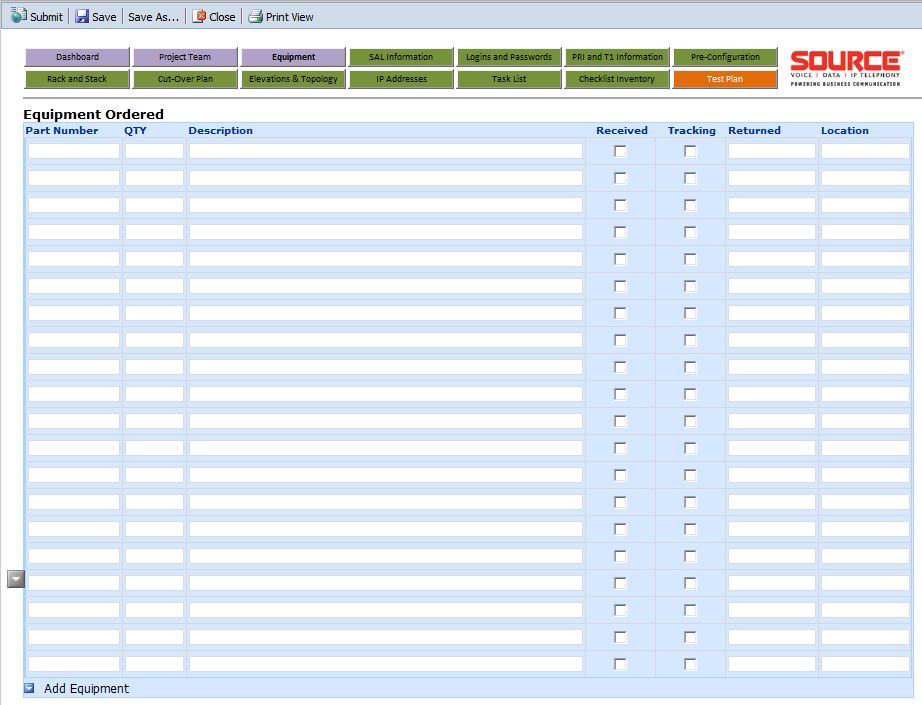
I have an InfoPath 2007 web-browser form that we use for project implementation plans containing about 10 views/pages. We use a new form for each project. One of the views/pages we use is an inventory list of parts ordered for each project. This table includes columns' Part Number, QTY, Description, Received, tracking, Returned, and Location text boxes and checkboxes. The data we would like to paste into this table are column's Part Number, QTY, and Description (3 fields. all text boxes).
This data is stored in a project inventory list containing these 3 columns. Each project inventory list is different for each project.
What we need to be able to do is to open the Excel project inventory list, highlight and copy these 3 columns, open the InfoPath form, navigate to the inventory view/page, and paste. The data from the Excel spreadsheet should paste into the form columns (aligned to match spreadsheet).
Right now, only the 1st text box receives the pasted data. It works like I want it to in the Preview view, but not once published.
Is this possible in 2007? If so, how?
I have been working on this project for 1.5 years now and only lack this last option in order to implement into production. I also setup a SharePoint/InfoPath 2010 test environment where I receive the same results. The only benefit in 2010 is that I can paste into a rich-text box, but then cannot include my table formatting and checkboxes.
I have attached a screen shot of my form page.