Installation went ok but cannot open infopath template.xsn due to permissions? - InfoPath Dev
in

InfoPath Dev

Installation went ok but cannot open infopath template.xsn due to permissions?

Last post 03-30-2011 08:51 AM by ErnestoM. 1 replies.
Page 1 of 1 (2 items)
Sort Posts: Previous Next
  • 03-30-2011 07:39 AM

    Installation went ok but cannot open infopath template.xsn due to permissions?

    Hi all,

    Windows 7 (64 bit)

    SQL SERVER 2008

     IE 8

    No Sharepoint though

    I installed the database accelerator and it went ok.

    When the Database Accelerator Control Panel page opens, i click on the DBXL Administration Tool link

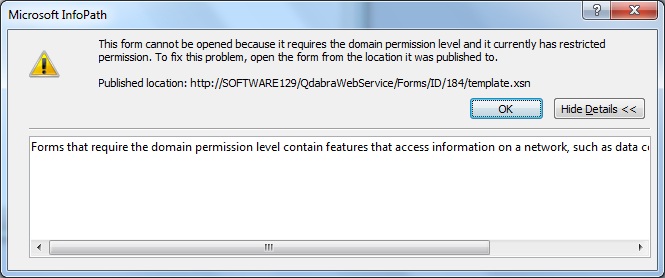
    the microsoft infopath UI opens but i immediately get a pop up error message which says the following:

    This form cannot be opened because it requires the domain permission level and it currently has restricted permission. to fix this, open the form from the location is was published to.

    Published location : http://<myserver>/QdabraWebService/Forms/ID/184/template.xsn

     now ive added my site to the trusted sites in IE options Ive also tried that link above and when i open in it IE i get a popup saying

    Do you want to open or save this file?

    template.xsn

    Open, Save,  Cancel

    and when i click the open button, I get the same error as above yet again.

     Can someone please help?

     PS have attached the error box that I see.

    Thanks

    Ross

    Ireland

  • 03-30-2011 08:51 AM In reply to

    Re: Installation went ok but cannot open infopath template.xsn due to permissions?

     Hi Ross,

    We have published steps for a solution here:

    http://www.infopathdev.com/blogs/ernesto/archive/2010/08/13/infopath-2010-fails-to-update-dat-due-to-caching-issue.aspx

    Let us know if this helps.

    Ernesto Machado
    Qdabra® Software/ InfoPathDev.com
    The InfoPath Experts – Streamline data gathering to turn process into knowledge.™


Page 1 of 1 (2 items)
Copyright © 2003-2019 Qdabra Software. All rights reserved.
View our Terms of Use.