Padding around form - InfoPath Dev
in

InfoPath Dev

Padding around form

Last post 02-10-2011 01:27 AM by mmoriarty. 2 replies.
Page 1 of 1 (3 items)
Sort Posts: Previous Next
  • 02-09-2011 06:05 AM

    Padding around form

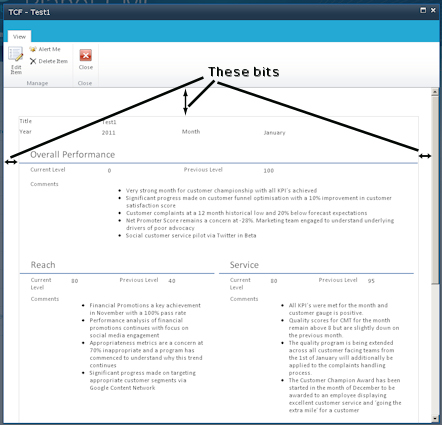
    I am using InfoPath 2010 to design forms for Sharepoint 2010 lists. I am concerned that every form I have put together seems to have a large white border at the left, right and top when viewed in Sharepoint. I would like this border to go away - it is inconvenient. Does anyone else have this issue, know why it appears and/or is there any best practice established around how to remove these borders? Thanks in advance, Frustrated of London
  • 02-09-2011 01:57 PM In reply to

     Could you attach a screenshot (via the Options tab)? I can't really visualize what you're describing...

    Ernesto Machado
    Qdabra® Software/ InfoPathDev.com
    The InfoPath Experts – Streamline data gathering to turn process into knowledge.™


  • 02-10-2011 01:27 AM In reply to

    Hi Ernesto - Thanks for taking an interest. Much appreciated.

    I hope I attached the screenshot correctly (this is my 1st time on this forum).

    There is a 10px bit of whitespace at the top that is generated by a custom stylesheet but it doesn't explain the rest.

    My point - is there any way to get rid of this in InfoPath, Sharepoint or is it something I'll have to manage out using stylesheets?
Page 1 of 1 (3 items)
Copyright © 2003-2019 Qdabra Software. All rights reserved.
View our Terms of Use.