switch between controls using Enter key--- is it posssible - InfoPath Dev
in

InfoPath Dev

switch between controls using Enter key--- is it posssible

Last post 01-07-2011 09:00 PM by Patrick Halstead. 1 replies.
Page 1 of 1 (2 items)
Sort Posts: Previous Next
  • 01-07-2011 09:24 AM

    switch between controls using Enter key--- is it posssible

    Hello,

    I'm totally newbie here. But so goad that I found there to learn and share information.

    My question is, is it possible that I can set up the Enter key to work as the Tab key or the down arrow key for the person who's filling the InfoPath form to switch from one control to another?

    Also, if it's a text control, can I then set Ctrl+Enter (instead of Enter as current setting is) to start a new paragraph?


    Thanks!


    Carol

  • 01-07-2011 09:00 PM In reply to

    Re: switch between controls using Enter key--- is it posssible

    Hi Carol,

    Your question is very timely. After 10 years of InfoPath experience (building the product at Microsoft followed by being an MVP here at Qdabra), we have finally figured out how to do this. We have a scanner solution that requires scanning barcodes into a register checkout form. Obviously, for ease of entry, we want to automate this.

    InfoPath doesn't allow you to treat a carraige return like a tab. However, in 2007, there is a feature that allows you to move to the next control when the field limit has been reached:
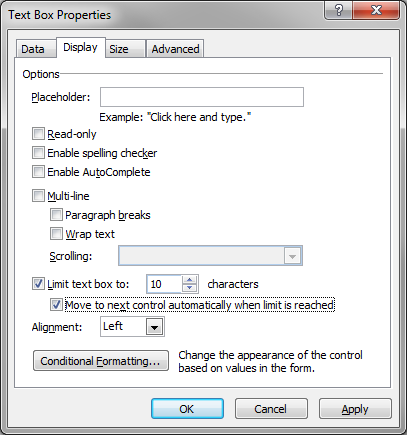
    autotab

    It only works if hte field is fixed widht and that may be an issue for you, but you could split the field up into smaller unit fields and add validation to make sure the thentries are valid.

    Hope this helps in some way

    Patrick Halstead
    Project Manager at Qdabra
Page 1 of 1 (2 items)
Copyright © 2003-2019 Qdabra Software. All rights reserved.
View our Terms of Use.