Conditional formatting issue - InfoPath Dev
in

InfoPath Dev

Conditional formatting issue

Last post 10-01-2010 10:21 AM by ErnestoM. 3 replies.
Page 1 of 1 (4 items)
Sort Posts: Previous Next
  • 09-29-2010 11:15 AM

    Conditional formatting issue

    Hello,

    I have a repeating table with a specific currency formatted column.  I am pulling the sum total of this column in a text box (textbox1) using "sum(column)" for default value of textbox1.  I am trying to hide a section based on whether this summed text box (textbox1) equals another textbox (textbox2).  So if textbox1 equals textbox2 hide this section.  If textbox1 does not equal textbox2 show this section.  I put this logic into the conditional formatting of the section and it is not working.  When I first open the form, it is hidden (which is good).  But when I enter any dollar amount in the column the section shows up.  Even if I enter the a dollar amount or series of dollar amounts that cause textbox1 to equal textbox2, the section stays shown.  I can clearly see that they are equal and are both textboxes formatted the same (decimal, currency, 2 decimal places).  Anyone have any idea what is wrong?

    Thanks,
    Aaron

  • 09-30-2010 06:33 AM In reply to

    Re: Conditional formatting issue

     Can you attach a screenshot of the conditional formatting window using the Options tab when you reply? Thanks

    Ernesto Machado
    Qdabra® Software/ InfoPathDev.com
    The InfoPath Experts – Streamline data gathering to turn process into knowledge.™


  • 10-01-2010 09:26 AM In reply to

    Re: Conditional formatting issue

    Thanks for responding.

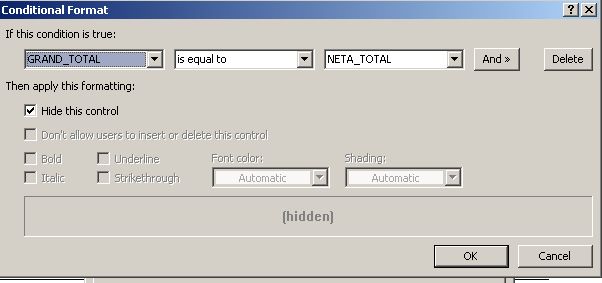
    I have attached a screenshot of the Options in the Conditional Formatting window of the section I want to hide.  As you can see, I have told it that when Grand Total and Neta_Total are equal to hide the section.  When the form is loaded, it is hidden as both of those fields are $0.00.   However, when numbers are entered and a calculation occurs, the section shows up regardless of what is entered.  Even if both Grand_Total and Neta_Total equal $5.00, it still shows up.

    Aaron

  • 10-01-2010 10:21 AM In reply to

    Re: Conditional formatting issue

    Thanks for the screenshot. The condition looks correct.

    Where is this condition set? You'll need to have the same condition on both the fields.

    I would also look at the fields' data types to make sure they match exactly.

    Ernesto Machado
    Qdabra® Software/ InfoPathDev.com
    The InfoPath Experts – Streamline data gathering to turn process into knowledge.™


Page 1 of 1 (4 items)
Copyright © 2003-2019 Qdabra Software. All rights reserved.
View our Terms of Use.