how to calculate fields based on the value entered and sum the total score - InfoPath Dev
in

InfoPath Dev

how to calculate fields based on the value entered and sum the total score

Last post 09-12-2019 08:26 AM by Hilary Stoupa. 3 replies.
Page 1 of 1 (4 items)
Sort Posts: Previous Next
  • 09-11-2019 01:00 AM

    how to calculate fields based on the value entered and sum the total score

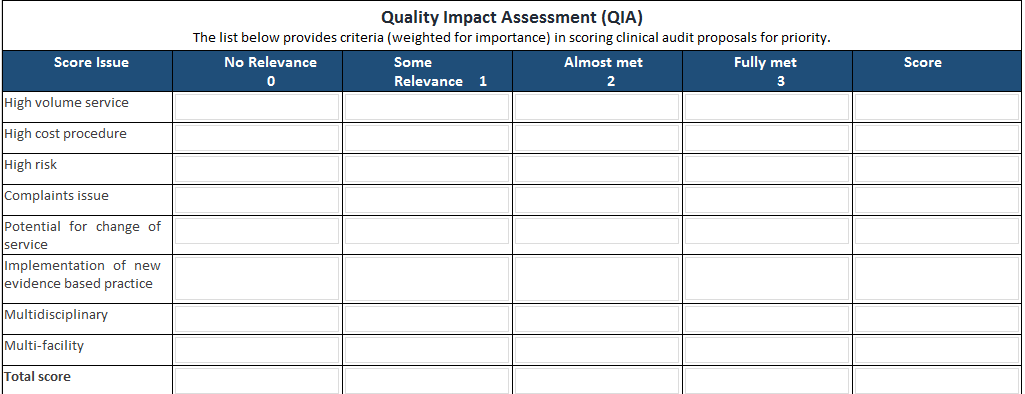
    Dear All, I have a form(refer attachment) 1. We should allow user to enter only one field that is either no relevance(zero), or some relevance(1) or almost met (2) or fully met(3). any one of the fields not two. 2. once user enter the value, we can multiply the entered value and store it into "score" field. 3. Finally we have sum the total score for all the fields. Please guide me how can i achieve this. Regards,
    Ramanjjilu Naidu
  • 09-11-2019 08:22 AM In reply to

    Re: how to calculate fields based on the value entered and sum the total score

    I would use option buttons for this... I'd also use default data and a repeating schema. See attached. Save the form locally, right click the downloaded form and select Design to open in design mode. From there you can preview and try it out. Depending on what your final reporting requirements are repeating data may not work for you (because of property promotion) but it sure makes this simpler. However, regardless of the rest of your structure, use option buttons with a number value and you can make "only select one" and summing the values very simple.
    Hilary Stoupa

  • 09-11-2019 09:24 PM In reply to

    Re: how to calculate fields based on the value entered and sum the total score

    Dear Hillary, Thank you so much for your reply, i have achieved this. Regards,
    Ramanjjilu Naidu
  • 09-12-2019 08:26 AM In reply to

    Re: how to calculate fields based on the value entered and sum the total score

    Hooray! Great job!
    Hilary Stoupa

Page 1 of 1 (4 items)
Copyright © 2003-2019 Qdabra Software. All rights reserved.
View our Terms of Use.