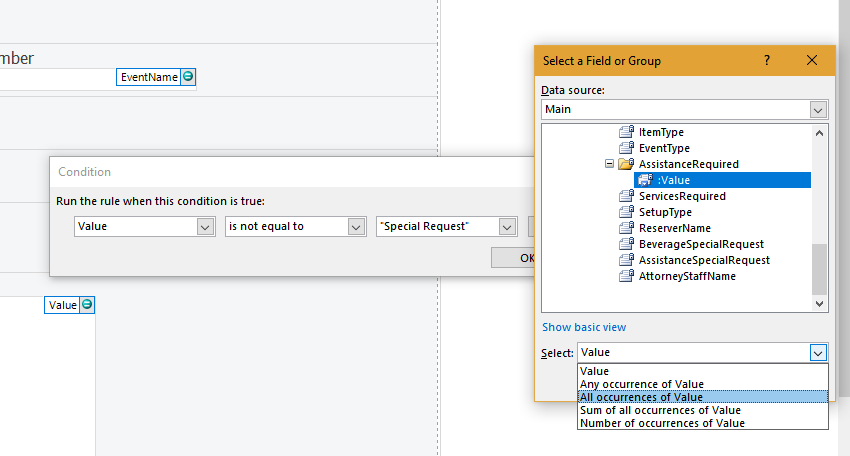
Hide/Show Section control - InfoPath Dev Sign in | Join | Help in Browser Forms InfoPath (Entire Site) InfoPath Dev InfoPath Dev is dedicated to bringing you the information and tools you need to be successful in your Microsoft Office InfoPath development projects. Home Blogs Forums Photos Downloads InfoPath Dev » InfoPath » Browser Forms » Hide/Show Section control Hide/Show Section control Last post 09-20-2018 04:28 PM by Hilary Stoupa. 1 replies. Page 1 of 1 (2 items) Sort Posts: Oldest to newest Newest to oldest Previous Next 09-18-2018 07:18 AM JohnSM Joined on 06-19-2018 Denver, CO Posts 48 Hide/Show Section control Template1.xsn Reply Contact I need to Hide/Show a 'Special Request' section based on a Checkbox Value in another field. I have a rule that Hides the control if the Value is 'Not Equal' to 'Special Request', but it's not working like it should. I'm stuck on this and need some assistance I'll attach the form, if someone cares to take a look.Thanks,John 09-20-2018 04:28 PM In reply to Hilary Stoupa Joined on 06-20-2008 Posts 13,297 Re: Hide/Show Section control scrn.png Mark as Not AnswerMark as Answer... Reply Contact Tricky. That's because this is a multi-select, I think. See the attached screenshot - when you create your formatting condition, you likely need to display the advanced view for the data source, then select all instances. Hilary Stoupa Page 1 of 1 (2 items) Copyright © 2003-2019 Qdabra Software. All rights reserved.View our Terms of Use.
I need to Hide/Show a 'Special Request' section based on a Checkbox Value in another field. I have a rule that Hides the control if the Value is 'Not Equal' to 'Special Request', but it's not working like it should. I'm stuck on this and need some assistance I'll attach the form, if someone cares to take a look.
Thanks,John