I do have this scenario for a browser enabled form.
I added two additional fields to my form, one to hold a the current formname (file name as appears on SharePoint) and one to hold a hyperlink to the form. I also added a button with a rule.
Field 1: "oldform_name" is a empty text field to hold what will become the previous form My rule on my button will set this field.
Field 2: is a 'hyperlink' that contains the URL to the current file that is open. I don't set this by any rule, this is the default value of the field.
Formula: concat(SharePointSiteUrl(), "CM/", txt_oldFormName, ".xml?OpenIn=Browser")
Button:
Rule1: Condition "none"
Action 1:Sets Field 1 value "oldform_name" = formname. <set oldform_name to the current open forms formname>
Action 2: Set (create) a new formname
Action 3: Submit to SharePoint
Action 4: Close this form: No Prompt.
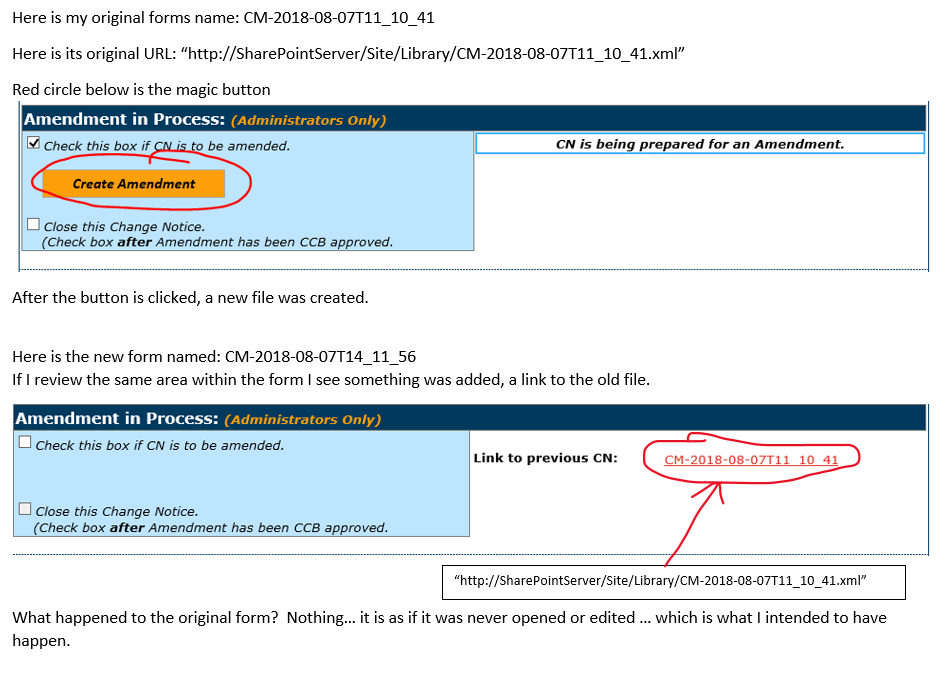
It may look a little counter intuitive - what this does is saves the current forms URL and Formname into two fields. Submits that form to SharePoint with a new formname (file name) and then closes it.
----------------------------------- see visual below ---------------------------------

I cannot upload my actual form as it is 'very huge and complex' but if you need a simple demo form let me know.