People Picker Issues - InfoPath Dev
in

InfoPath Dev

People Picker Issues

Last post 01-12-2018 11:44 AM by Hilary Stoupa. 13 replies.
Page 1 of 1 (14 items)
Sort Posts: Previous Next
  • 01-03-2018 02:18 PM

    People Picker Issues

    Hi, this is my first time trying to use a People Picker in a form and I have a couple of problems.  I'm using InfoPath/SharePoint 2010, browser form, using qRules. The goal is to use the people in the People Picker field in the list to send an email from workflows (this part works fine).

    1.  The biggest issue is I need to map the People Picker on the form into a People Picker field in the SharePoint list (submittosharepointlist qrule). Can this be done? I'm getting the Command error "Error occurred updating a list item: Invalid look-up value.  A look-up field contains invalid data. Please check the value and try again.". I've tried mapping to the pc:Person, the DisplayName and the AccountID... just trying to get something to work. But I get the error on all accounts. Any ideas?

    2. I have a workaround (not exactly pretty, but passable), but I'd like to read the  existing list people into the form People Picker field so they can be edited. I can't figure out how to successfully default these in. So, right now, I have the form displaying the current people, and then if they use the People Picker field, it will overwrite the existing people and they can change the people as needed.(see image)

    Thanks for any help!

    Gwen


  • 01-03-2018 02:36 PM In reply to

     Hi, Gwen - you'll need to add a helper field with a default and map that instead of your actual people picker fields. More on that here: http://www.infopathdev.com/blogs/hilary/archive/2013/01/17/qrules-submittosharepointlist-and-a-person-or-group-column-type.aspx and here: http://www.infopathdev.com/forums/p/29616/101474.aspx

     If your SharePoint list allows multiple persons to be selected, to populate a people picker, you'd need to insert instances of the repeating group and set the fields. Personally, I'd use an XSLT and the Transform command for this - let me know if you need a hand & I'll try to work up a sample in the next few days.


    Hilary Stoupa

  • 01-04-2018 08:25 AM In reply to

    Hi Hilary, thanks for the info! I was able to do the concatenation correctly (see screenshot), and then I mapped that field to the people picker field in the list. But now, I'm getting an error on my submittosharepoint command - "Failed to find list item for SharePoint List FSR - Data List - Details,  Id: 32" (that is the correct list name and ID number for the item). Any idea?

    For the sample to populate a people picker, that would be great if you can throw one together. I haven't ever used an xlst/transform command :). No hurry, I still have a long way to go on this form before it's live.

    Thanks! Gwen


  • 01-04-2018 10:47 AM In reply to

    Without the people picker mapped, are you able to update items? Seems like that would be a good place to start debugging.
    Hilary Stoupa

  • 01-04-2018 12:35 PM In reply to

    Yes, with it not built into the map, the map writes fine. I did more testing... if I don't select anyone with the people picker, it submits fine, but as soon as I pick people, if gives that error. Hmmm...I just tried picking only one person, and it submitted fine. So, it's only when I pick more than one person that I get that error.  I checked the list field properties and I do have it set to allow multiple selections (people only, no groups).

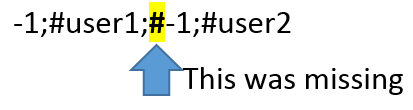
    So, thinking it may be the concatenation... I looked back at your blog and response to the post (the 2 links you sent). In the blog you have a # before the "-1;" for the 2nd person (see screenshot), but it doesn't look like the concat formula does (from your response), which I copied/pasted.  

    Originally I was using... substring(xdMath:Eval(xdMath:Eval(../my:pp_Draftgroup/pc:Person/pc:AccountId[. != ""], 'concat(";-1;#", .)'), ".."), 2). So I added the other # to get: substring(xdMath:Eval(xdMath:Eval(../my:pp_Draftgroup/pc:Person/pc:AccountId[. != ""], 'concat(";#-1;#", .)'), ".."), 2)

    Resulting formula: # -1;#EVERPACK\hastd;#-1;#EVERPACK\wilsog

    So, I get the error because of the initial #, but not when I manually remove it from the text box. So manually manipulating it, I can get it to submit multiple people. Now to figure out how to get rid of that first # that the concatenation is adding (but I need it before the 2nd person).

    So, I wrapped your formula in a substring-after function... substring-after(substring(xdMath:Eval(xdMath:Eval(../my:pp_Draftgroup/pc:Person/pc:AccountId[. != ""], 'concat(";#-1;#", .)'), ".."), 2), "#")  and now it works :)

    Thanks for all your help! I never would've gotten it without you! 

    (the screenshot is from your blog post, and shows what I was missing in my formula) 


  • 01-04-2018 12:40 PM In reply to

    Awesome detective work! I'll try to get a transform sample put together before EOD tomorrow. :)
    Hilary Stoupa

  • 01-04-2018 02:47 PM In reply to

    Hey, Gwen - I just created a connection to a list that had a people picker with multiple values allowed, and in the secondary data source, the structure is the same as in my main data source! Can you try using CopyTable and see if that works for you?
    Hilary Stoupa

  • 01-11-2018 02:28 PM In reply to

    Sorry, just now replying. So, if I use CopyTable, wont' that pull in all the fields (not just the people picker ones)? I already have the data pulled into the view from a query. I would hate to do it all again (thinking performance...this thing is huge already). If I could put a default value on my IP people picker field, that would work... but that's not an option on that field. 


    gwen 

  • 01-11-2018 02:34 PM In reply to

    I'm not suggesting you copy the whole thing. Just the people picker repeating section.
    Hilary Stoupa

  • 01-11-2018 02:36 PM In reply to

    I should add - I'll put together a transform sample for you if that doesn't work - but it worked well in my sample so thought it might be an easier way! :) Love your profile picture, by the way.
    Hilary Stoupa

  • 01-11-2018 03:19 PM In reply to

    You said the transform uses dbxl, right? If so, don't worry about it. I don't have dbxl, only have q rules. I really don't think they will let me spend any money right now. I appreciate it anyhow! :) I figured it was time for a picture after all these years lol
  • 01-11-2018 03:36 PM In reply to

    No, Transform is a qRules command - the XSLT can be created in any text editor. Did you try copy table?
    Hilary Stoupa

  • 01-12-2018 11:29 AM In reply to

     You are so awesome! I had only used copytable to copy the entire datasource, I didn't realize (just wasn't thinking) that you could do part.  I played around with it and got it working! Woohoo!  Thank you!!!

    Gwen 

  • 01-12-2018 11:44 AM In reply to

    Well and it hadn't occurred to me that the people picker structure in the list data connection would be the same as the main source when I suggested using a transform. :) Glad that worked for you!
    Hilary Stoupa

Page 1 of 1 (14 items)
Copyright © 2003-2019 Qdabra Software. All rights reserved.
View our Terms of Use.