infopath query specific sharepoint list data programmatically - InfoPath Dev
in

InfoPath Dev

infopath query specific sharepoint list data programmatically

Last post 02-06-2018 08:05 AM by Hilary Stoupa. 11 replies.
Page 1 of 1 (12 items)
Sort Posts: Previous Next
  • 09-21-2017 09:18 AM

    infopath query specific sharepoint list data programmatically

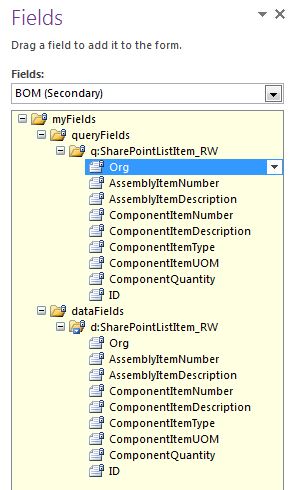
    Hi, Is it possible to perform query to the query fields of secondary datasource? I have a list of 10K rows and i throws an error (The attempted operation is prohibited because it exceeds the list view threshold enforced by the administrator) something like this, but this one doesnt work

    xIter = bomDS.Select("/dfs:myFields/dfs:dataFields/q:SharePointListItem_RW[q:AssemblyItemNumber = '" + assyItemNum + "']", NamespaceManager);

    bomDS = DataSources["BOM"].CreateNavigator().SelectSingleNode("/dfs:myFields/dfs:dataFields/q:SharePointListItem_RW[q:Title = '" + c_ItemNumber + "']", NamespaceManager);

    spConn = this.DataConnections["BOM"];

    spConn.Execute();

  • 09-29-2017 07:40 AM In reply to

    Re: infopath query specific sharepoint list data programmatically

     Hi - sorry I missed this last week. If you are getting an error based on the list threshold, usually adding indexes to the columns you are likely to query on will resolve that issue.

    Hilary Stoupa

  • 01-24-2018 04:10 AM In reply to

    Re: infopath query specific sharepoint list data programmatically

    How to add indexes to the column, im using O365 sharepoint? Thank you
  • 01-24-2018 07:44 AM In reply to

    Re: infopath query specific sharepoint list data programmatically

    Under the List Settings, scroll down till you are beneath all the columns - there should be links there for the pages for adding indexes.
    Hilary Stoupa

  • 02-01-2018 12:00 AM In reply to

    Re: infopath query specific sharepoint list data programmatically

    Hilary Stoupa:
    Under the List Settings, scroll down till you are beneath all the columns - there should be links there for the pages for adding indexes.
    Unsure what to do but im still getting the issue list threshold. :( i already added the two column to indexes i get the error when it goes to spConn2.execute
  • 02-01-2018 12:18 AM In reply to

    Re: infopath query specific sharepoint list data programmatically

    indexes
  • 02-02-2018 08:04 AM In reply to

    Re: infopath query specific sharepoint list data programmatically

    Interesting - I'd expect that having indexes added would resolve the issue... what about the default view for the list? Is it under the threshold?
    Hilary Stoupa

  • 02-04-2018 10:16 PM In reply to

    Re: infopath query specific sharepoint list data programmatically

    No threshold issue in the default view, its folderize. 5k each folder.
  • 02-05-2018 04:57 AM In reply to

    Re: infopath query specific sharepoint list data programmatically

    Unsure what happens but it works now when i commented out the setting of the "Title" field. //bomDS.SelectSingleNode("/dfs:myFields/dfs:queryFields/q:SharePointListItem_RW/q:Title", NamespaceManager).SetValue(org); bomDS.SelectSingleNode("/dfs:myFields/dfs:queryFields/q:SharePointListItem_RW/q:AssemblyItemNumber", NamespaceManager).SetValue(assyItemNum);
  • 02-05-2018 09:46 AM In reply to

    Re: infopath query specific sharepoint list data programmatically

    That would indicate that the title field isn't indexed. Is it? I see in your screenshot that "ORG" is indexed, I was assuming that was a renamed Title field...
    Hilary Stoupa

  • 02-06-2018 02:00 AM In reply to

    Re: infopath query specific sharepoint list data programmatically

    Yes, ORG is the renamed Title field.
  • 02-06-2018 08:05 AM In reply to

    Re: infopath query specific sharepoint list data programmatically

    How odd. I would think as long as it is indexed, you'd be able to query on it.
    Hilary Stoupa

Page 1 of 1 (12 items)
Copyright © 2003-2019 Qdabra Software. All rights reserved.
View our Terms of Use.