Form with Prev/Next record buttons to navigate through Sharepoint List - InfoPath Dev
in

InfoPath Dev

Form with Prev/Next record buttons to navigate through Sharepoint List

Last post 09-01-2017 01:03 PM by GMUDuckman. 2 replies.
Page 1 of 1 (3 items)
Sort Posts: Previous Next
  • 08-26-2017 11:36 AM

    Form with Prev/Next record buttons to navigate through Sharepoint List

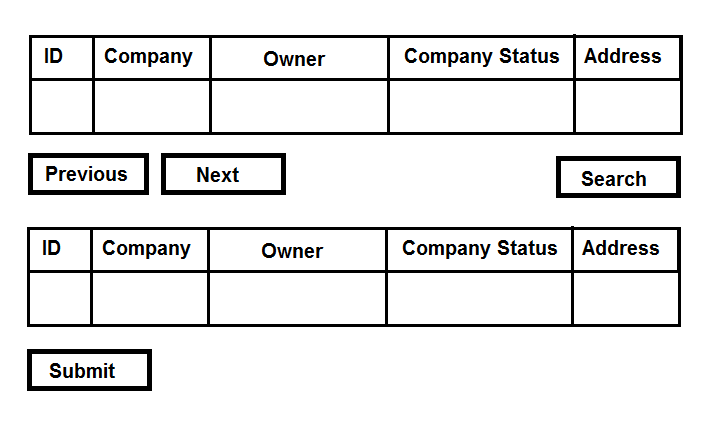
    Hello, Current situation: I have a Sharepoint List of companies, each have a Status (Active, Inactive, Pending) that we use to review them. The ones that are in 'Pending' status are placed on a queue, and those are the ones we have to work on. Right now we have a form where we simply Query by "Pending" companies and we get the whole queue at once, making it overwhelming. What I need: Attached I include a mock design of what I was asked to do. A form that allow us to search vendors by Name, ID or Status etc. on one side, but that when a user click on "Next", the form display the first Pending company on the queue, and as the user keeps clicking Next, the form shows the following record and so on. Can you help me or point me in the right direction as to what to read to achieve this? Thank you!
  • 08-28-2017 07:37 AM In reply to

    Re: Form with Prev/Next record buttons to navigate through Sharepoint List

    What I want the Next/Previous button to do, is to move through the array of ID's of the records on Pending status, being able to edit the result and submit it to the Sharepoint List. If they were consecutive starting from 1, that would be simple, but I'm having a hard time finding the logic to jump from one ID to another non-consecutive ID of the Pending group of items. I'm exploring workarounds now, but failing at it. I would appreciate your help. Thanks!
  • 09-01-2017 01:03 PM In reply to

    Re: Form with Prev/Next record buttons to navigate through Sharepoint List

    https://blogs.technet.microsoft.com/meamcs/2013/03/17/infopath-2010-paging-without-coding/ Check that article out - it may do what you are trying to do? You may have to add a "submit data" rule to your next and previous page buttons to have it "save as they go along"
Page 1 of 1 (3 items)
Copyright © 2003-2019 Qdabra Software. All rights reserved.
View our Terms of Use.