Recalculate lot price selection after changes in table - InfoPath Dev
in

InfoPath Dev

Recalculate lot price selection after changes in table

Last post 08-24-2017 02:12 PM by FlameKurosei. 33 replies.
Page 1 of 3 (34 items) 1 2 3 Next >
Sort Posts: Previous Next
  • 08-08-2017 09:02 AM

    Recalculate lot price selection after changes in table

    Good day everyone,

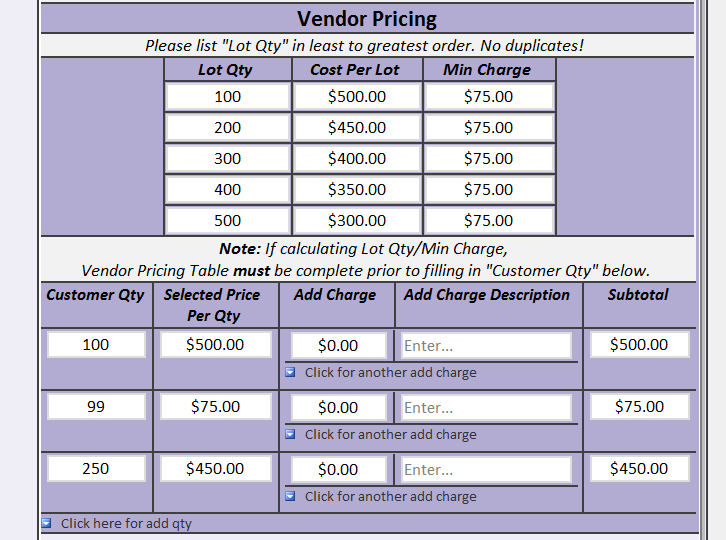
    This is my first time posting on the forum, and I'm quite new to Infopath. I'm currently working on creating a cost estimate (Infopath filler) form for a factory, and I'm having trouble with making rules for the lot table. Essentially, the estimate is for producing a machinery part for a customer, and requires several "steps" in a procedure, some of which require materials from another vendor, some manufactured in the factory. The vendor calculates in lots and minimum charges, "lots" meaning batches of 100, 200, 5000 pieces of material, etc., and minimum charges whenever the machinery part requires material quantities lower than the specified lot size. If a desired quantity is between two lot sizes, it takes the lower lot (for example, if 100 pieces = $500, and 200 pieces = $450, and the customer wants 150 pieces, it will cost $500).  I realize this is confusing, so here's a screenshot of a completed step, excluding other costs like additional charges (attached).

     My issue with this table is that it's currently a one-way method. I put in the lot/min charges, and then the customer quantity, and then the "selected price per qty" field updates to the respective amount upon cilcking. Is there a way to have it in reverse, where the customer quantity is put in first, and then when the lots are put in, it recalculates the "selected price per qty" field? Currently when I do it the reverse way, the "selected price per qty" field shows nothing. Perhaps some kind of "refresh" button so it can recalculate everything again in the table? Furthermore, this table is in a repeating table, and would need to be different every time depending on the vendor. Also, not all the "Lot Qty" fields are used every time--it can be only 500 and 1000 pieces, or even none of them and it's manually typed in, etc.

     If possible, I'd like this to be based mostly on conditional rules/default values/etc., as I am unfamiliar with coding.

     Thank you very much,

    ~Flame

  • 08-08-2017 12:54 PM In reply to

    Re: Recalculate lot price selection after changes in table

     Yeah, I'd think you could do this with a default on the selected price per qty field. Can you attach a copy of your form under the options tab in a reply?

    Hilary Stoupa

  • 08-08-2017 01:27 PM In reply to

    Re: Recalculate lot price selection after changes in table


    Hilary Stoupa:

     Yeah, I'd think you could do this with a default on the selected price per qty field. Can you attach a copy of your form under the options tab in a reply?

    Sweet! Here it is attached. I altered the company's name to "factory" on all fields, for privacy's sake. Please take a look at the "Page 3-ROUTING" view, specifically at the Outside Services section's Vendor Pricing table.

    Thanks for the help so far,

     ~Flame


  • 08-08-2017 02:05 PM In reply to

    Re: Recalculate lot price selection after changes in table

    So - is this form in production yet? Or are you still developing it? Because if we normalize the schema a bit for your Vendor Pricing table, this would be a lot simpler....
    Hilary Stoupa

  • 08-08-2017 02:24 PM In reply to

    Re: Recalculate lot price selection after changes in table

    Hilary Stoupa:
    So - is this form in production yet? Or are you still developing it? Because if we normalize the schema a bit for your Vendor Pricing table, this would be a lot simpler....

     No, it is not in use yet, as I've hit a few stuck places that are in need of fixing. What do you suggest?

  • 08-08-2017 02:27 PM In reply to

    Re: Recalculate lot price selection after changes in table

    The vendor pricing table should be repeating. You can use defaults to include 5 rows for new forms, and then disable the insert widget, if you only ever want 5 rows. It would be easier then to create a default that would get the correct price based on the qty in the other table. I'll make some mods to your for this so you can see what I mean.
    Hilary Stoupa

  • 08-08-2017 02:33 PM In reply to

    Re: Recalculate lot price selection after changes in table

    Hilary Stoupa:
    The vendor pricing table should be repeating. You can use defaults to include 5 rows for new forms, and then disable the insert widget, if you only ever want 5 rows. It would be easier then to create a default that would get the correct price based on the qty in the other table. I'll make some mods to your for this so you can see what I mean.

    I tried to make it repeating before, but I had trouble because I needed the "Selected Price Per Qty" to change based on how many rows of the Vendor Pricing Table are in use. Forgive my ignorance, but are you saying I could I have it so that it could be repeating, and a different Vendor Pricing Table per step? (If so that's great! Please inform me.)


  • 08-08-2017 03:46 PM In reply to

    Re: Recalculate lot price selection after changes in table

    I don't quite understand what you mean by "a different Vendor Pricing Table per step", but give this a try. Save the linked form locally, right click & select design to open in design mode & then you can preview.
    Hilary Stoupa

  • 08-09-2017 08:18 AM In reply to

    Re: Recalculate lot price selection after changes in table


    Hilary Stoupa:
    I don't quite understand what you mean by "a different Vendor Pricing Table per step", but give this a try. Save the linked form locally, right click & select design to open in design mode & then you can preview.

    Oh, yes this is what I was looking for! I meant because I made something like this before, but the same Vendor Pricing Table would show up each time I clicked for another Outside Service step ("Op #" in the form). In other words, Step 10 would have Lot 1 = 100 at $5.00, and Step 20=100 at $5.00 also. I couldn't find a way to make them not duplicate each time, so I thank you for the assistance.

    May I ask how preceding/following sibling codes work? Is there somewhere I can read more on it? I'm wondering if I can just copy-paste this rule to the "Raw Material" view's pricing table, but that section is a Master/Detail rather than a repeating table.

  • 08-09-2017 10:33 AM In reply to

    Re: Recalculate lot price selection after changes in table

     I like this site a lot: http://zvon.org/comp/r/tut-XPath_1.html

    As far as using the same formula, the XPaths change based on the field, the location, the desired fields you wish to use - so let me know if you need a hand and which view / field & I can help you with this. :)

    As to what happened when you tried a repeating table before, your issue may have been improper nesting. You need that repeating table inside the other repeating group in the schema.  

    Hilary Stoupa

  • 08-09-2017 10:49 AM In reply to

    Re: Recalculate lot price selection after changes in table

     All right, thanks so much Hilary--I'm going to take a look through this site now. Another question, if you don't mind--would I be able to have the "Customer Qty" value duplicated across several views? I'm trying to make it so that the quantities don't have to be retyped for every new Vendor Pricing Table on each page.

    I'm assuming this will work: On the first view (Customer Information), I can have a repeating table for "Customer Qty", and then on the next couple of views (Raw Material, Routing) have a calculated value field carry over the "Customer Qty" field into the respective Vendor Pricing Table? Is this logic correct or impossible?

  • 08-09-2017 11:00 AM In reply to

    Re: Recalculate lot price selection after changes in table

    I think that should work. You plan to have 5 rows in each table? You should be able to use count of preceding-sibling to get the right row for each.
    Hilary Stoupa

  • 08-09-2017 12:16 PM In reply to

    Re: Recalculate lot price selection after changes in table


    Hilary Stoupa:
    I think that should work. You plan to have 5 rows in each table? You should be able to use count of preceding-sibling to get the right row for each.

     Yes, I set 5 rows by default, as vendors tend to provide 5 lots in their tables. However, I'm hitting another roadblock as I can't seem to get the calculated value (i.e. "Customer Qty") to repeat. I have attached an image of what I mean--I typed in 3 quantities on the first page, but only 1 (the last quantity, 99), shows.

    How do I get the calculated values to show the same amount of quantities as the first page? Note that the first page's ("Customer Information") table and the second one ("Raw Material") are two different tables, in case that's important. (I'm assuming I'm missing something very obvious here, haha.)


  • 08-09-2017 12:26 PM In reply to

    Re: Recalculate lot price selection after changes in table

    Oh - I must have misunderstand what you wanted to happen - you wanted 3 rows in the second table if there were 3 in the first? I'm afraid IP just doesn't do that... you could add rows by default, use defaults to set the first field to your other table value, and hide blanks, but that is sort of messy.
    Hilary Stoupa

  • 08-09-2017 12:36 PM In reply to

    Re: Recalculate lot price selection after changes in table

    Hilary Stoupa:
    Oh - I must have misunderstand what you wanted to happen - you wanted 3 rows in the second table if there were 3 in the first? I'm afraid IP just doesn't do that... you could add rows by default, use defaults to set the first field to your other table value, and hide blanks, but that is sort of messy.

    Ah, I see--sorry for the miscommunication on my part. I wanted to find a way so that the quantities wouldn't have to be retyped over and over in each view, because in the current method, the person has to fill out 100, 200, 99 into page 1, then page 2, page 3, and so on. I worry the person filling out the form will make a mistake (say, 200, 300, 99 on the second page, etc.) and then the overall total cost will be different and incorrect in the summary. Is there a way to mitigate this? Perhaps setting some validation rules so each view/page is consistent?

    (Thank you for the quick replies so far--you've been a great help.)

Page 1 of 3 (34 items) 1 2 3 Next >
Copyright © 2003-2019 Qdabra Software. All rights reserved.
View our Terms of Use.