Field reset after submit - InfoPath Dev
in

InfoPath Dev

Field reset after submit

Last post 08-10-2017 11:58 AM by lwenzel90. 22 replies.
Page 1 of 2 (23 items) 1 2 Next >
Sort Posts: Previous Next
  • 07-31-2017 06:29 AM

    Field reset after submit

    I have a form that has food items, prices and their quantities for a user to request. All of the items, prices and quantities on the form are queried from a SharePoint list so they can be easily updated in the future. When the form is submitted it is saved to a document library. Each item in the list has a column labeled quantity with a value of zero. The issue that I have been having is when a user submits the form, all of the quantities are being overwritten back to 0 from the SharePoint list. I need to see what the user has changed the quantity fields to. Is there a way to not query after a form has been submitted or is there a way to have an associated quantity to each food item from a SharePoint list without "quantities" being its own column in the SharePoint list.
  • 07-31-2017 08:35 AM In reply to

    Re: Field reset after submit

    I am using a secondary data connection from a SharePoint list. I retrieve my quantities from the data fields portion of the connection. When I submit the form I would like SharePoint to save the input into those fields, while also having the form query the quantities with defaults of zero from the SharePoint list. I can give more explanation if needed. Thanks in advance!
  • 07-31-2017 08:43 AM In reply to

    Re: Field reset after submit

    Hey - I was worried about this when I last saw your form - but thought maybe you were just submitting via email. Secondary data sources aren't updated on submit. Secondary data isn't saved on submit. That's why when I suggested a repeating structure & default data, the main data source was used for the items....
    Hilary Stoupa

  • 07-31-2017 09:04 AM In reply to

    Is there a way to have a quantity field that is set in the main data connection that is a part of the repeating section I have on my form?
  • 07-31-2017 09:15 AM In reply to

    Re: Field reset after submit

    No, there isn't - you can't combine repeating data like that.... but there is a way you could populate the main data source from your secondary data source! Attach your latest form & I'll fix it up later today for you. :)
    Hilary Stoupa

  • 07-31-2017 09:54 AM In reply to

    Hilary you are way to kind and I can not thank you enough! Thank you!
  • 07-31-2017 04:10 PM In reply to

    Re: Field reset after submit

    So - is the desired outcome that the form only have the items that match on department?
    Hilary Stoupa

  • 07-31-2017 04:48 PM In reply to

    So - I have NO way to preview this to see if it works, but what I did was add default data, set the ID field based on a default value, then added a rule to the ID field to set the other values. But it may need some other tweaks to get it right. :)
    Hilary Stoupa

  • 08-01-2017 05:41 AM In reply to

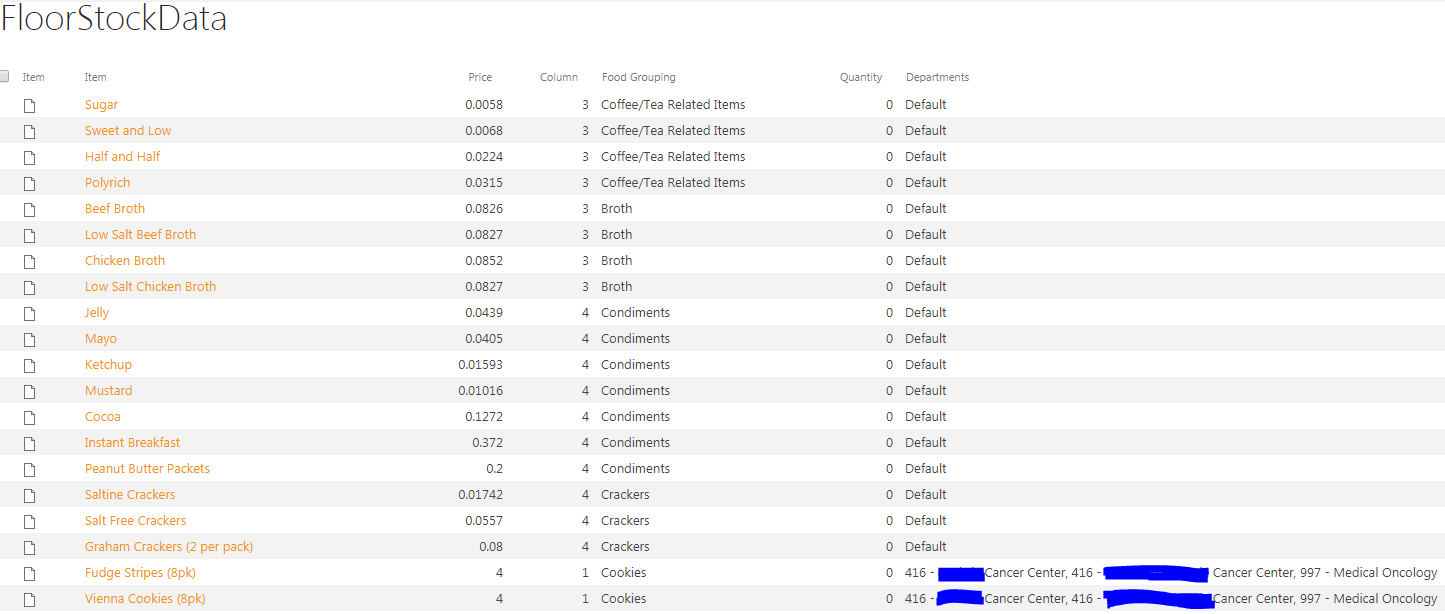
    Thank you for the fast response! The desired outcome is to have each food item check a repeating field of departments associated with it and then compare that to the main department field on the form. If the fields match it will show an item if not it will hide it. The department field also can hold multiple values per department, as to say the departments at my work place have overlapping items and over 20 departments are unique with the options they have. There are also a group of items that are used in every department that I have given the value of "Default". The picture below shows the information as presented in the sharepoint list. I am not sure if the optional field you created will be able to what is required of this form. Is there a way to set a repeating fields data from the secondary data source similar to what you did with fields such as item, price, quantity, etc? I think it is necessary to have the department values for each item in the form.
  • 08-01-2017 12:09 PM In reply to

    Re: Field reset after submit

     Yeah, you may need to just add the department field to the same place in the main data source - but how may items are in your SharePoint list? A lot? In which case it may be better to just query for the specific department to populate the order section, then have the same fields in another group (called options or something) and use another connection to the same list to just get back the default items....

    Hilary Stoupa

  • 08-01-2017 12:52 PM In reply to

    Re: Field reset after submit

    I am sorry but I am still confused. I am not sure how to get the departments from the secondary data source. I would need to have the information as a repeating data field and I am a novice to this. But to answer your question about list items, there are about 140 in the list.
  • 08-01-2017 02:12 PM In reply to

    Re: Field reset after submit

    I would query for only the list items that matched on department, then have a second connection that only returned items where the department = default.... I think that might work. I'll try to modify the form I sent to take care of the first part of that, but it will be tomorrow afternoon before I have time. :)
    Hilary Stoupa

  • 08-02-2017 06:18 AM In reply to

    Re: Field reset after submit

    Does that mean I need to create another list with only the default options or just another data connection possibly with a filter of some kind?
  • 08-02-2017 08:15 AM In reply to

    Re: Field reset after submit

    I just realized we can't use Department as a query field because it is repeating. I have an idea for how to make this work tho ... I'll post later w/ another copy of your form. I think what I need to do is change the default for ID to only include items that either match on department or have the value of default as a department. Then you only have data that should be displayed in the form copied into the main DS. :)
    Hilary Stoupa

  • 08-02-2017 03:21 PM In reply to

    Well. Let's see if this works? I modified the default on the ID field to (hopefully) only include items that match on department OR have Default for department... Again, working totally blind here, so this could be all kinds of wrong. :)
    Hilary Stoupa

Page 1 of 2 (23 items) 1 2 Next >
Copyright © 2003-2019 Qdabra Software. All rights reserved.
View our Terms of Use.