Populate field depending on option selected - InfoPath Dev
in

InfoPath Dev

Populate field depending on option selected

Last post 08-03-2017 08:17 PM by poporacer. 2 replies.
Page 1 of 1 (3 items)
Sort Posts: Previous Next
  • 07-26-2017 05:53 PM

    Populate field depending on option selected

    I ran across another issue. I have a list that is designed for an employee to transfer to a different department. The process is that the employee will fill out the form and select what department he currently works in and then select as many departments that he is interested in transferring to from a multi select listbox. Each Department has a view that shows the employees that have requested to come to their department. This will make the package "in route" and I can create the filters for this and it works fine. Every department can see only those applicants that want to work in their department. The problem I am having is that when the department actually receives the formal request, we need to Know that the package was received and by which department so that the view for the respective department can now be in a "received" status. I am not sure how to set up the list or how to create the entry. All of the data entry is done through an InfoPath form. I was thinking that I could create a date field column for each department and when the package is received by a department, the received date will be in the column that corresponds with that department and the View for the "received" packages will be fairly simple. There are 35 departments. But I don't know how to set up the InfoPath form to put the received date in the correct column. I can put an option selection to identify which department is entering the received date, but how can I get InfoPath to put the data in the correct column? I don't want 35 boxes and the user put the date in the correct one. Is there a better method than this or how do I make this method work properly. Thanks for taking your time to look at this.
  • 08-03-2017 08:20 AM In reply to

    Re: Populate field depending on option selected

     I'm sorry, I've read this several times and am having a hard time understanding the question. Maybe you could attach some screenshots under the Options tab in a reply to help describe this? 

    Hilary Stoupa

  • 08-03-2017 08:17 PM In reply to

    Re: Populate field depending on option selected

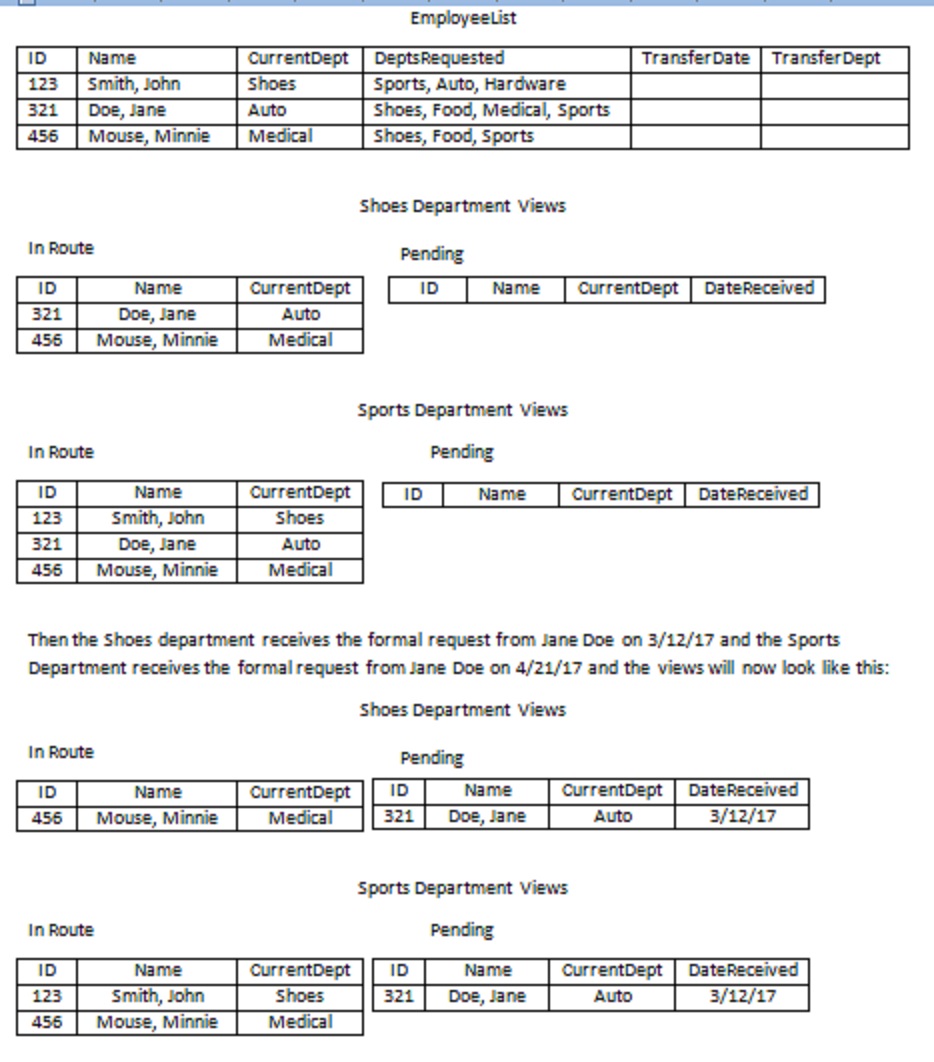
    thiI will try to rephrase it a little better, I am at home and the site is at work so I can't send screenshots but I attached a word doc to hopefully make it a little more clear. Employees will request a transfer by entering the request in SharePoint via an InfoPath form. This will be in EmployeeList. The employee will enter their current department and all the departments that they want to transfer to (a Multi-select textbox) Once this information is entered, the pertinent information will show up in each department's view. Each department will have 2 views, One is "in Route" to show requests that have been entered but the paperwork has not arrived yet. The other view is "Pending" which will show requests that have been entered and the formal request has been received. I do a lot of database programming and maybe my brain is just stuck on relational tables and SQL queries to get the desired results. Here are a few of my thoughts One list with the employee ID, Name, currentDepartment, RequestedDepartments This list will have only one entry for each employee requesting to transfer one list with employee Id, ReceivedDepartment, ReceivedDate This list will have an entry for each employee for each department they want to transfer to. So if an employee wants to transfer to 3 departments, there will be 3 entries. With this method, I thought of a couple ways it might be handled but just can't make it work Somehow have InfoPath submit the data to the two different lists, but I don't think that is possible I could have one InfoPath form for the initial entry and then another form for the receiving departments entry. On the Receiving Department's InfoPath form, they will enter the employee ID and the employee's relevant data will be populated via a lookup column? and then enter the relevant data. With this, how would I validate the data so there will only be one employee entry for each department they are transferring to so then you don't Get duplicate entries. And on a wild thought, have the EmployeeList with a field for each Department that will contain the date that the package was received. (there are 35 departments) then on the InfoPath form. There will be 35 date boxes (one for each Department) stacked on top of each other. Have a department selection list and when the department is selected, the corresponding date picker will become visible and the rest hidden. I think the second one would be the path to go but not sure if there is a better method
Page 1 of 1 (3 items)
Copyright © 2003-2019 Qdabra Software. All rights reserved.
View our Terms of Use.