InfoPath 2010 change secondary data source in repeating section - InfoPath Dev Sign in | Join | Help in General InfoPath (Entire Site) InfoPath Dev InfoPath Dev is dedicated to bringing you the information and tools you need to be successful in your Microsoft Office InfoPath development projects. Home Blogs Forums Photos Downloads InfoPath Dev » InfoPath » General » InfoPath 2010 change secondary data source in repeating section InfoPath 2010 change secondary data source in repeating section Last post 07-19-2017 07:45 AM by Hilary Stoupa. 5 replies. Page 1 of 1 (6 items) Sort Posts: Oldest to newest Newest to oldest Previous Next 07-14-2017 07:50 AM BrianAdams Joined on 05-12-2017 Ft Eustis, Va Posts 63 InfoPath 2010 change secondary data source in repeating section 20170714 TQMS Template.xsn Reply Contact I need to change the Secondary Data Source for a repeating section, however, get the following message "binding a non-repeating field or group is not supported in SharePoint list forms. to fix this problem, bind the control to a non-repeating field or group." Need to rebind all fields: Primary Location, Course Manager and Program Manager in Course Info section bound to "Courses TQMS " changed to "Active_Course_Info_for_IP_forms". How do I fix this issue? See attached template. Thank you in advance 07-14-2017 12:04 PM In reply to Hilary Stoupa Joined on 06-20-2008 Posts 13,297 Re: InfoPath 2010 change secondary data source in repeating section scrn1.png Mark as Not AnswerMark as Answer... Reply Contact Start from the section, then re-bind the fields. So, right click the section, change binding, select the repeating section from your new data source. Then after you have done that, you can rebind each field. Hilary Stoupa 07-17-2017 08:47 AM In reply to BrianAdams Joined on 05-12-2017 Ft Eustis, Va Posts 63 Re: InfoPath 2010 change secondary data source in repeating section Mark as Not AnswerMark as Answer... Reply Contact How do you filter the section so only the values corresponding to the CourseCd appear in the section? 07-18-2017 12:14 PM In reply to Hilary Stoupa Joined on 06-20-2008 Posts 13,297 Re: InfoPath 2010 change secondary data source in repeating section Mark as Not AnswerMark as Answer... Reply Contact I would probably just query for the correct rows - so set the data connection to not query data on load, and on the course code drop down, add rules that set the course code query field in the data connection to the selected code, then query the data source. Or, you can add a formatting rule to the repeating section - just hide rows where the course code doesn't equal the selected course code. Let me know if you need me to update your form w/ this to better explain. :) Hilary Stoupa 07-19-2017 06:48 AM In reply to BrianAdams Joined on 05-12-2017 Ft Eustis, Va Posts 63 Re: InfoPath 2010 change secondary data source in repeating section Mark as Not AnswerMark as Answer... Reply Contact Thanks, you gave me enough information to let me figure it out, different way of thinking to get the repeating section working, at least for me anyway. I had to run the query on load because it affected another drop-down, but got it working. I had to think about it a little bit. Thanks again 07-19-2017 07:45 AM In reply to Hilary Stoupa Joined on 06-20-2008 Posts 13,297 Re: InfoPath 2010 change secondary data source in repeating section Mark as Not AnswerMark as Answer... Reply Contact You bet - glad you got it working the way you need it to. Yeah, if you are already using the data source for something where you need all the rows, you just have to hide the rows you don't need. :) Hilary Stoupa Page 1 of 1 (6 items) Copyright © 2003-2019 Qdabra Software. All rights reserved.View our Terms of Use.
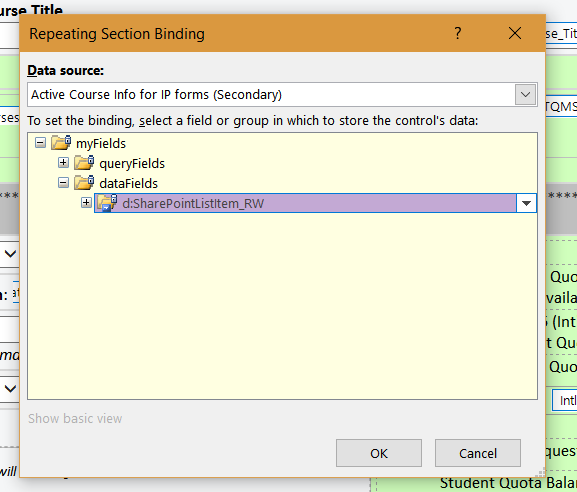
I need to change the Secondary Data Source for a repeating section, however, get the following message "binding a non-repeating field or group is not supported in SharePoint list forms. to fix this problem, bind the control to a non-repeating field or group." Need to rebind all fields: Primary Location, Course Manager and Program Manager in Course Info section bound to "Courses TQMS " changed to "Active_Course_Info_for_IP_forms". How do I fix this issue? See attached template. Thank you in advance