Edit multiple list items with one form - InfoPath Dev
in

InfoPath Dev

Edit multiple list items with one form

Last post 08-30-2017 12:56 PM by Hilary Stoupa. 26 replies.
Page 2 of 2 (27 items) < Previous 1 2
Sort Posts: Previous Next
  • 08-01-2017 02:47 AM In reply to

    • _asp_
    • Not Ranked
    • Joined on 07-08-2017
    • Posts 19

    Re: Edit multiple list items with one form

    Thanks a lot Hilary, I think I found my mistake.

    I have to put the fields from the secondary connection in the display view (I was using fields from the main connection).

    The problem is  I cannot put "data and time" fields using the secondary connection and I have many of them :(

  • 08-01-2017 07:47 AM In reply to

    Re: Edit multiple list items with one form

    I'm not sure what you mean.... why not just use calculated values, formatted as date time?
    Hilary Stoupa

  • 08-01-2017 07:52 AM In reply to

    Re: Edit multiple list items with one form

    And I just tried in my test form, adding the created date to my secondary data connection, drug the field onto the form and IP used a date time control - can you maybe attach a screenshot of what is happening when you try this?
    Hilary Stoupa

  • 08-01-2017 08:33 AM In reply to

    • _asp_
    • Not Ranked
    • Joined on 07-08-2017
    • Posts 19

    Re: Edit multiple list items with one form

     Please see the attached image.


  • 08-01-2017 08:52 AM In reply to

    Re: Edit multiple list items with one form

    I just didn't add those columns when I created my secondary data source. :)
    Hilary Stoupa

  • 08-01-2017 09:01 AM In reply to

    • _asp_
    • Not Ranked
    • Joined on 07-08-2017
    • Posts 19

    Re: Edit multiple list items with one form

     Silly me! :D

    You are right!

    Thanks again for all you help, you were very kind and helpful :) 

  • 08-15-2017 02:39 AM In reply to

    Re: Edit multiple list items with one form

    Hi Hilary
    Thank you for your great solution!
    There is one thing I have trouble with is that how can I detect whether currently I'm in Edit Mode or in Display Mode so that I can display the view accordingly.
    Currently, I have 2 departments, 2 views (edit and display) for each department.
    I set the form load rules as follow:
    1. If Title is not blank and it is from department 1, query for data.
    2. If Title is not blank and it is from department 2, query for data and switch to department 2 display view.
    This works perfectly in the display view, however, if I edit an item, I cannot get into the Edit View of that department, it just loads the Display View to edit.

    I don't know how to distinguish between Edit Mode and Display Mode so that I can use the form load rule to switch view (they seem to be the same)?
    I wonder if you can help me to find the solution for this problem!
    Thank you for your help.
  • 08-21-2017 08:34 AM In reply to

    Re: Edit multiple list items with one form

    You have the display view set correctly in the form options? I don't understand this: "I don't know how to distinguish between Edit Mode and Display Mode so that I can use the form load rule to switch view (they seem to be the same)? " - want to attach your template?
    Hilary Stoupa

  • 08-29-2017 02:37 AM In reply to

    Re: Edit multiple list items with one form

    Hi Hilary,
    Thanks for your reply. I have been able to fix my issue :)
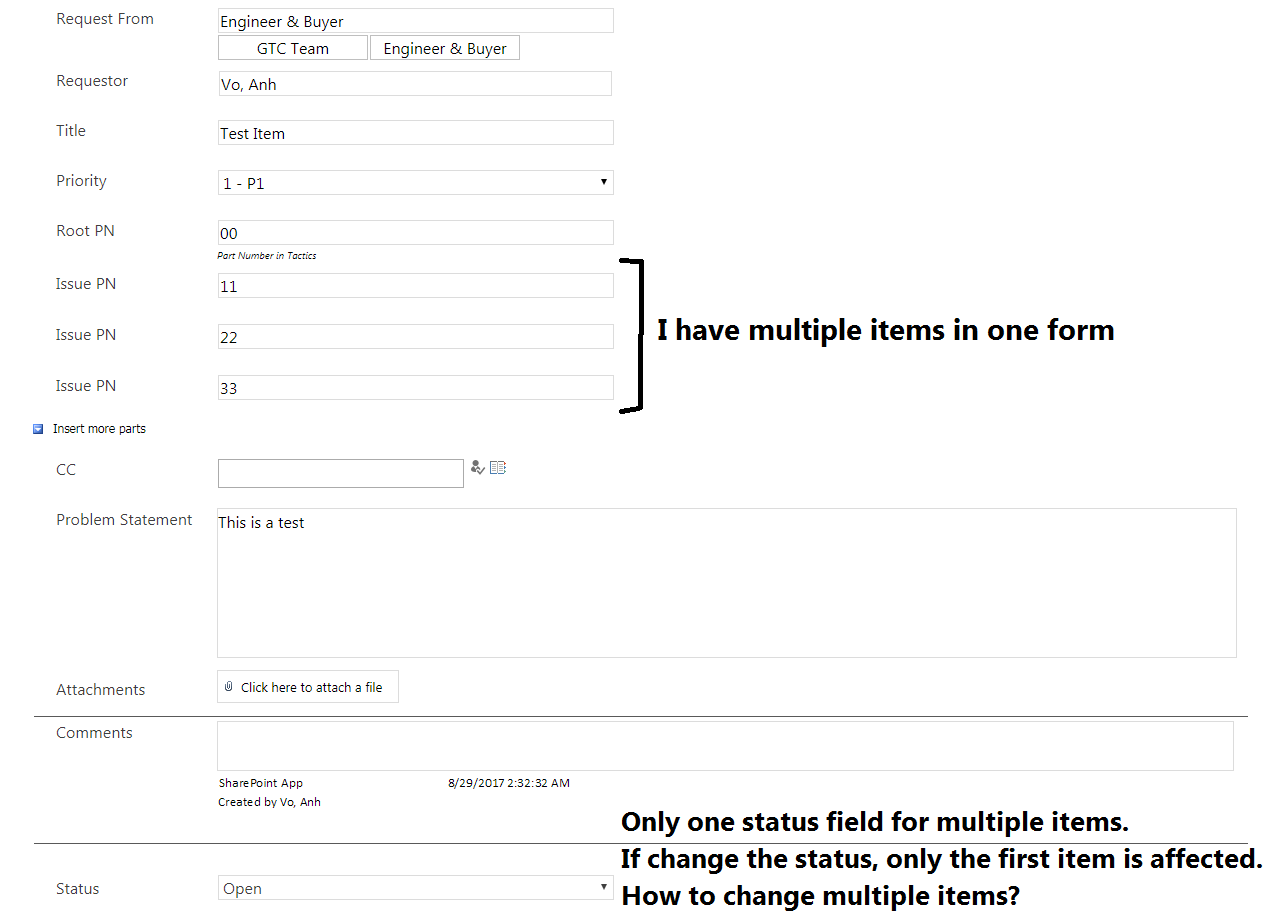
    I still have one more problem left that is how can I edit the repeated section in all items in just one action?
    For example,
    I have a field called "Status". This field is only displayed once if there are multiple items with the same Title.
    When I change the Status, only the first item in all these multiple item is affected.
    I would like to all these multiple items get the change too.
    How can I achieve this?
    I have attached the picture to describe the situation.
    Thank you for your time and support.
  • 08-29-2017 03:39 PM In reply to

    Re: Edit multiple list items with one form

    I would add an XML file to the form's resources, with some helper fields for setting the statuses and then create a data connection to it. Then, on the Status field in your repeating group, add a rule to set the helper field, so that you can put a rule on it. That rule will then set the status fields. Easier to show than describe, so I've attached a simple sample. Save the form locally, right click, select design & preview. You'll see when you preview that I added a lot of nodes by default - that's to make sure my logic doesn't generate a looping error.
    Hilary Stoupa

  • 08-29-2017 07:10 PM In reply to

    Re: Edit multiple list items with one form

    Thank you so much for this. It works like a charm.
  • 08-30-2017 12:56 PM In reply to

    Re: Edit multiple list items with one form

    Hooray! Glad that worked for you.
    Hilary Stoupa

Page 2 of 2 (27 items) < Previous 1 2
Copyright © 2003-2019 Qdabra Software. All rights reserved.
View our Terms of Use.