Clearing data that was queried from a secondary data source - InfoPath Dev
in

InfoPath Dev

Clearing data that was queried from a secondary data source

Last post 01-30-2018 10:47 AM by Hilary Stoupa. 10 replies.
Page 1 of 1 (11 items)
Sort Posts: Previous Next
  • 05-25-2017 06:51 AM

    Clearing data that was queried from a secondary data source

    In an InfoPath form, is there an easy way to clear the data that was previously queried from a secondary data source (i.e. SharePoint list)?  Basically what I've been doing is re-querying that same datasource by setting a query field to a value that wouldn't ever match any records (so no data is returned). For a big list, that shows in performance (may be a few seconds before going to the next action rule). I'm hoping there is a cleaner way to dump the data. Any thoughts?

    I'm using SharePoint/InfoPath 2010 and have qRules. 

    Thanks!

    Gwen 

  • 05-26-2017 03:41 PM In reply to

    Re: Clearing data that was queried from a secondary data source

    If you are using qRules - you could just use the delete command to delete all the data in the secondary data source. :)
    Hilary Stoupa

  • 06-02-2017 07:42 AM In reply to

    Re: Clearing data that was queried from a secondary data source

     Hi Hilary!  So, will this write back to SharePoint and actually delete the data (I always assumed it would, so never tried this, sorry that may be stupid thinking :) )? I don't want to do that, I just want to delete what's cached in the form.

     Gwen 

  • 06-02-2017 08:07 AM In reply to

    Re: Clearing data that was queried from a secondary data source

    This is a secondary data source? InfoPath won't submit anything but the main data source. The secondary data in your form is just a copy of the data from when you queried it..... Maybe I don't understand the question?
    Hilary Stoupa

  • 06-02-2017 08:13 AM In reply to

    Re: Clearing data that was queried from a secondary data source

     No we are good. Thanks! I don't know why but I thought it would write the delete directly to the list for some reason (I wasn't thinking about when I do write to the list, it's via a map). I just didn't think the process through :).

     I just tried it and it worked great (and very fast). Thanks!

  • 06-02-2017 08:21 AM In reply to

    Re: Clearing data that was queried from a secondary data source

    Ah, I understand the confusion. Yeah, even qRules Submit To SharePoint list only submits from main data sources. :) Glad that sorted it!
    Hilary Stoupa

  • 01-24-2018 02:55 PM In reply to

    Re: Clearing data that was queried from a secondary data source

     Hi Hilary,

    I'm running into this same issue with another form (I'm assuming the other form is working fine with it (but now I'm wondering) LOL)... So, I'm querying a secondary data source (sp list) and when the user changes a filter drop down, I want to requery based on the filter picked (query rules on filter dropdown field). So, what's happening (see screenshots),  first query = TST, only returns 3 records (this is correct). I query a second time = Repsonder, and only those same 3 records are returned (these TST people are also Responders). But actually there are like 30 Responders that I should be getting. So, it seems like the original query is cached, and then it's just running the second query on that cache (not going back to the splist). I've tried it in all combinations, so it's just not one query broke... they work fine individually with a fresh run of the form.

    So, I added the Delete qRules command and it's the first rule now. On first query it errors (which I expect cause there isn't anything to delete). Second query is a success, but the data is still wrong just like before.

     Any thoughts or suggestions?  :).... SP 2010, IP 2010, qRules 8.1

    Thanks!

    Gwen 
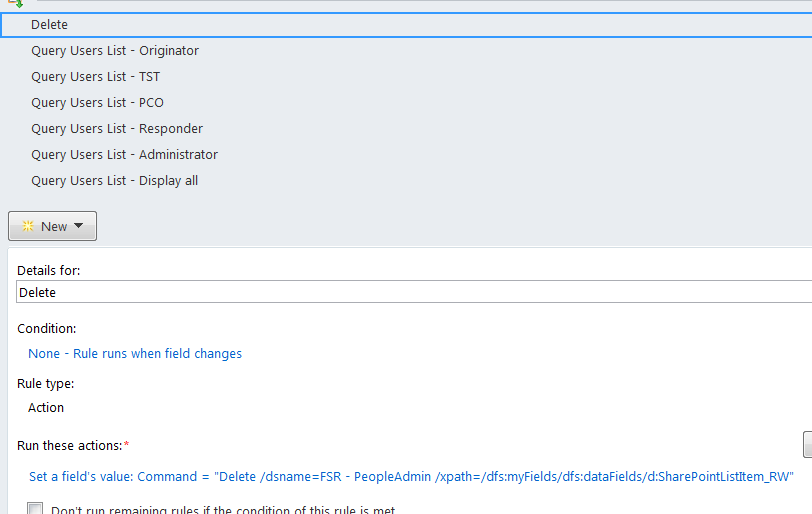


  • 01-25-2018 08:15 AM In reply to

    Re: Clearing data that was queried from a secondary data source

     Adding another screenshow


  • 01-25-2018 10:06 AM In reply to

    Re: Clearing data that was queried from a secondary data source

    Can I take a look at your form? You can attach it under the options tab or email it to me (I think you have my email?)
    Hilary Stoupa

  • 01-25-2018 10:46 AM In reply to

    Re: Clearing data that was queried from a secondary data source

     Thanks! I just emailed it to you.

  • 01-30-2018 10:47 AM In reply to

    Re: Clearing data that was queried from a secondary data source

    You aren't resetting your filter after you query. :) So, in your rules on the filter, you set a field to yes and query, but the next time you query, the field is still set to yes! Just add a rule after each query to clear the query field & you should be set.
    Hilary Stoupa

Page 1 of 1 (11 items)
Copyright © 2003-2019 Qdabra Software. All rights reserved.
View our Terms of Use.