Repeating Table - Displaying Current Data and Prior Data - InfoPath Dev
in

InfoPath Dev

Repeating Table - Displaying Current Data and Prior Data

Last post 04-28-2017 09:02 PM by dannylam4. 4 replies.
Page 1 of 1 (5 items)
Sort Posts: Previous Next
  • 04-25-2017 01:32 PM

    Repeating Table - Displaying Current Data and Prior Data

    Hi, I'm trying to do a report that pulls data entries stored in a Sharepoint Library. I've managed to get this working, but it is being requested that the Prior Month's data is pulled for each category as well. I've created a 2nd data source to pull in the same information but with the Month - 1. So for example, if I wanted to pull in Budget Information for the department, and the Budget Information for the department of the prior month, it should look like:


    >>>>>>>>>>>>>>>>>>>>>>

    [Human Resources]
    Budget Info - January 2017
    30.45 - Projected
    31.00 - Used
    (0.55) - Total

    [Human Resources]
    Budget Info - December 2016
    130.54 - Projected
    130.00 - Used
    (0.54) - Total

    [IT]
    Budget Info - January 2017
    60.00 - Projected
    58.12 - Used
    01.88 - Total

    [IT]
    Budget Info - December 2016
    178.00 - Projected
    182.00 - Used
    (4.00) - Total

    etc. etc.

    >>>>>>>>>>>>>>>>>>>>>>

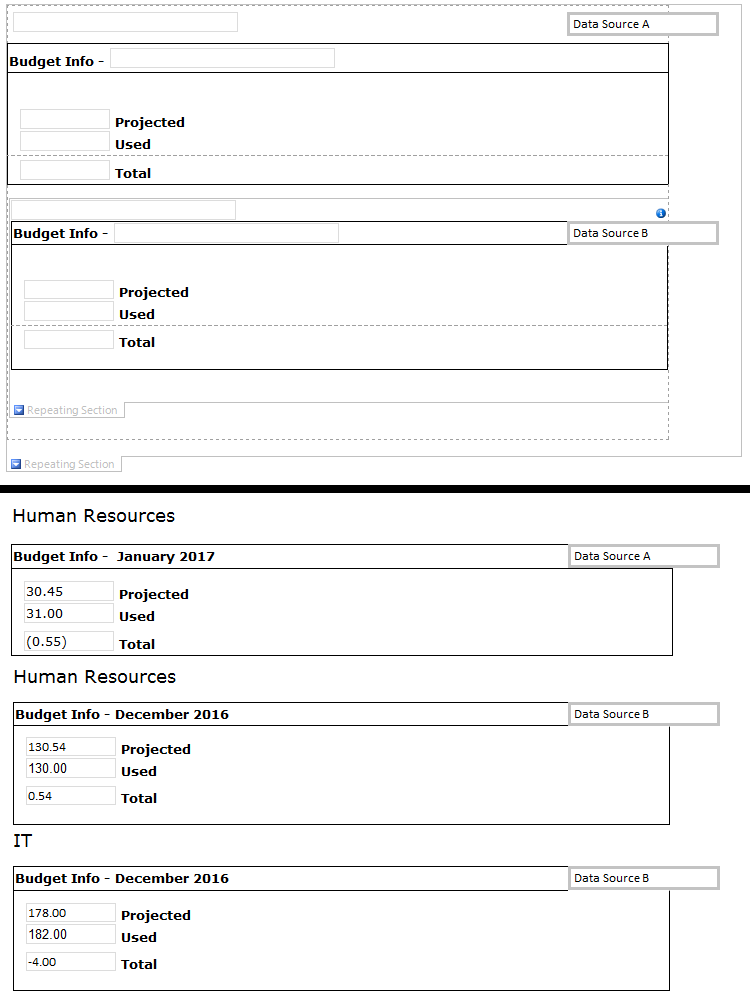
    Currently, however, it will display the current Department and Date's data (Data Source A), and then all the data of the previous date (Data Source B), the next Department and Date's data, and repeat all of Data Source B. Example:

    >>>>>>>>>>>>>>>>>>>>>>

    [Human Resources]
    Budget Info - January 2017
    30.45 - Projected
    31.00 - Used
    (0.55) - Total

    [Human Resources]
    Budget Info - December 2016
    130.54 - Projected
    130.00 - Used
    (0.54) - Total

    [IT]
    Budget Info - December 2016
    178.00 - Projected
    182.00 - Used
    (4.00) - Total

    [Legal]
    Budget Info - December 2016
    etc. etc.

    >>>>>>>>>>>>>>>>>>>>>>

    Is there any way to embed the data from Data Source B into the same section of Data Source A where the Departments match? Hopefully this has made sense. I've attached an image of what it currently looks like (ignore the weird formatting, I was setting up for testing)
    Filed under:
  • 04-27-2017 06:48 AM In reply to

    Re: Repeating Table - Displaying Current Data and Prior Data

     Oh that is going to be tricky - because of the two different data sources, both repeating data, and InfoPath doesn't out of the box offer any way to merge things. We sometimes use show / hide formatting to work around this - so your "previous" data would only show on a button click and you can query specifically for it..... I'm kinda wondering about using some helper fields for this, however, since you only need one month before, not one or many..... I'll try to work up a simple sample later today. Basically, I think you could add more fields than you need to display for data connection A, and then repurpose some of those fields so that they are populated w/ data from data connection B.....

    Hilary Stoupa

  • 04-27-2017 04:58 PM In reply to

    Re: Repeating Table - Displaying Current Data and Prior Data

     Sorry - didn't have a chance to do this today - will try again tomorrow!

    Hilary Stoupa

  • 04-28-2017 07:59 AM In reply to

    Re: Repeating Table - Displaying Current Data and Prior Data

     Okay - here's a very simple sample, using helper fields in a main DS with default data. Save the form locally, preview, click the button. Now, obviously, since you have secondary data sources, you can't just go adding helper fields for the prior data - but what you can do is re-use existing fields. For example - the rules on my "Helper" field, you could put on your ID field. I put rules on a button - you'll probably want those in form load rules, or after you query for your secondary data. I've got a field called "LYAmount" that I'm setting to the prior year amount, but you could repurpose a different SharePoint list data connection field that you don't need for your display, like "version" or something - make sense?

    Hilary Stoupa

  • 04-28-2017 09:02 PM In reply to

    Re: Repeating Table - Displaying Current Data and Prior Data

    That makes sense, I am able to add additional fields to the original form, so I can create a PreviousAmount field, do a query for the old data and then store it into the new field. Only thing would mean I would have to go back to the original forms and resubmit them to populate those fields, but it isn't a big deal in my case as we're only implementing it for this year and going forward. Thanks for the assistance!
Page 1 of 1 (5 items)
Copyright © 2003-2019 Qdabra Software. All rights reserved.
View our Terms of Use.