Unable to promote a column with username function - sharepoint online, infopath - InfoPath Dev
in

InfoPath Dev

Unable to promote a column with username function - sharepoint online, infopath

Last post 01-03-2017 09:34 PM by Office365_Developer. 4 replies.
Page 1 of 1 (5 items)
Sort Posts: Previous Next
  • 01-03-2017 06:34 AM

    Unable to promote a column with username function - sharepoint online, infopath

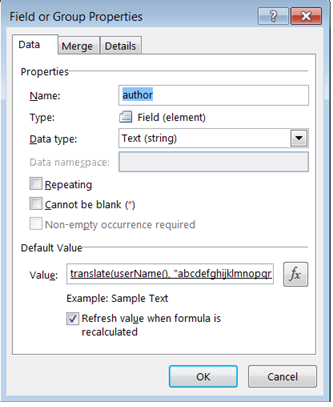
    InfoPath Form Unable to save/submit a value in a library column in SharePoint Online via InfoPath 2013. It is saving blank value. The field contains the function username() and I want to save it as uppercase. I have attached a snapshot of column properties. The column in library is of type "Single Line of text" in the library. When I try to display this value in a textbox, it works fine. But when I try to save the same value to the library, it saves as blank. While publishing this form, I Tried to promote this as a "Core Document column". Also, tried promoting this column as a part of the group "This form library". When I submit the form, there is a column in library which should be updated with username. This does not happen. Any idea why this is not working in sharepoint online?
  • 01-03-2017 07:53 AM In reply to

    Re: Unable to promote a column with username function - sharepoint online, infopath

    Maybe try to promote the column as a new column. Also check the library's settings page - do you maybe have more than one column with this name? I think Author is the internal name of the "Created By" column that exists in all lists / libraries, but I can't imagine that is the issue - I'd assume SharePoint would just create a new column with a different internal name.
    Hilary Stoupa

  • 01-03-2017 09:55 AM In reply to

    Re: Unable to promote a column with username function - sharepoint online, infopath

    If I promote the column as new column, there are some existing 1k items in the library which will not reflect this value. Also, I checked there is no other column with same name. I suspect there is some issue with username() function here - not sure. Kindly suggest! Thank you!
  • 01-03-2017 10:06 AM In reply to

    Re: Unable to promote a column with username function - sharepoint online, infopath

    Well, if in your form when you put this field on the form there is a value in preview, does it also have a value in the browser? I find it unlikely that there is an issue with the user name function - as far as I've seen, that function returns a value in browser forms in Office 365. You may not like the value - it will be using claims authentication and have some stuff in the front you may want to use substring-after to remove.
    Hilary Stoupa

  • 01-03-2017 09:34 PM In reply to

    Re: Unable to promote a column with username function - sharepoint online, infopath

    It has a value in preview. It shows a value in browser. But when I click on Submit, I am saving it to a "single line of text" field in the library. It saves as a blank.
Page 1 of 1 (5 items)
Copyright © 2003-2019 Qdabra Software. All rights reserved.
View our Terms of Use.