Date Picker Icon Not Displaying Correctly - InfoPath Dev
in

InfoPath Dev

Date Picker Icon Not Displaying Correctly

Last post 02-27-2017 03:09 PM by Jaitsujin. 6 replies.
Page 1 of 1 (7 items)
Sort Posts: Previous Next
  • 11-02-2016 05:14 PM

    Date Picker Icon Not Displaying Correctly

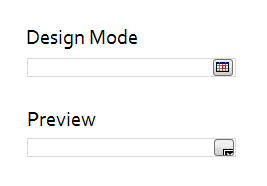
    All my Date Picker controls seem to be broken.

    When designing a form the icon looks just fine, but once previewed or published it is changed to a grey box with an x displaying. This behavior is not just happening on my computer and started about 2 month ago.

    Does anyone have the same issue? Or even better a fix? 


    UPDATE: Found this and uninstalled Security Update KB3192391. No Success. Post above mentioned KB3194798, but that one wasn't even installed. I'll check if any of the other Updates triggered this issue.

  • 11-03-2016 07:43 AM In reply to

    Re: Date Picker Icon Not Displaying Correctly

    Another participant in the string you found had emailed me about the updates she had to uninstall - screenshot attached. Personally - I'm currently just living w/ the issue and hoping another update will eventually resolve it.
    Hilary Stoupa

  • 02-23-2017 11:04 PM In reply to

    Re: Date Picker Icon Not Displaying Correctly

    I tried uninstalling software updates and adding sites to my trusted sites. I upgrade to a brand new computer with a new OS (win) new Office (2016) and new InfoPath (2013).

    Created a blank form, added one date field and only previewed it. Still same issue. InfoPath needs to be fixed....  

    Filed under:
  • 02-24-2017 07:36 AM In reply to

    Re: Date Picker Icon Not Displaying Correctly

    Did you try adding about:internet to Trusted Sites in Internet Explorer? The original thread you found has that as a suggestion and it has worked on my machine.
    Hilary Stoupa

  • 02-26-2017 08:20 PM In reply to

    Re: Date Picker Icon Not Displaying Correctly

     I did. Also not working. And I'm not sure why it would effect the InfoPath Preview. I'm not even opening using the browser.

  • 02-27-2017 07:42 AM In reply to

    Re: Date Picker Icon Not Displaying Correctly

    InfoPath leverages Internet Explorer for security and rendering.
    Hilary Stoupa

  • 02-27-2017 03:09 PM In reply to

    Re: Date Picker Icon Not Displaying Correctly

     Did not know that. Thanks.

     Well, I learned to just live with it... Problem is that I get a lot of calls in a company with about 1000 employee... Still hoping for a fix to come out.

Page 1 of 1 (7 items)
Copyright © 2003-2019 Qdabra Software. All rights reserved.
View our Terms of Use.